TikZ online
Draw TikZ online in your browser: the picture is source code next to your text, and a real TeX Live compiles it on every engine here.
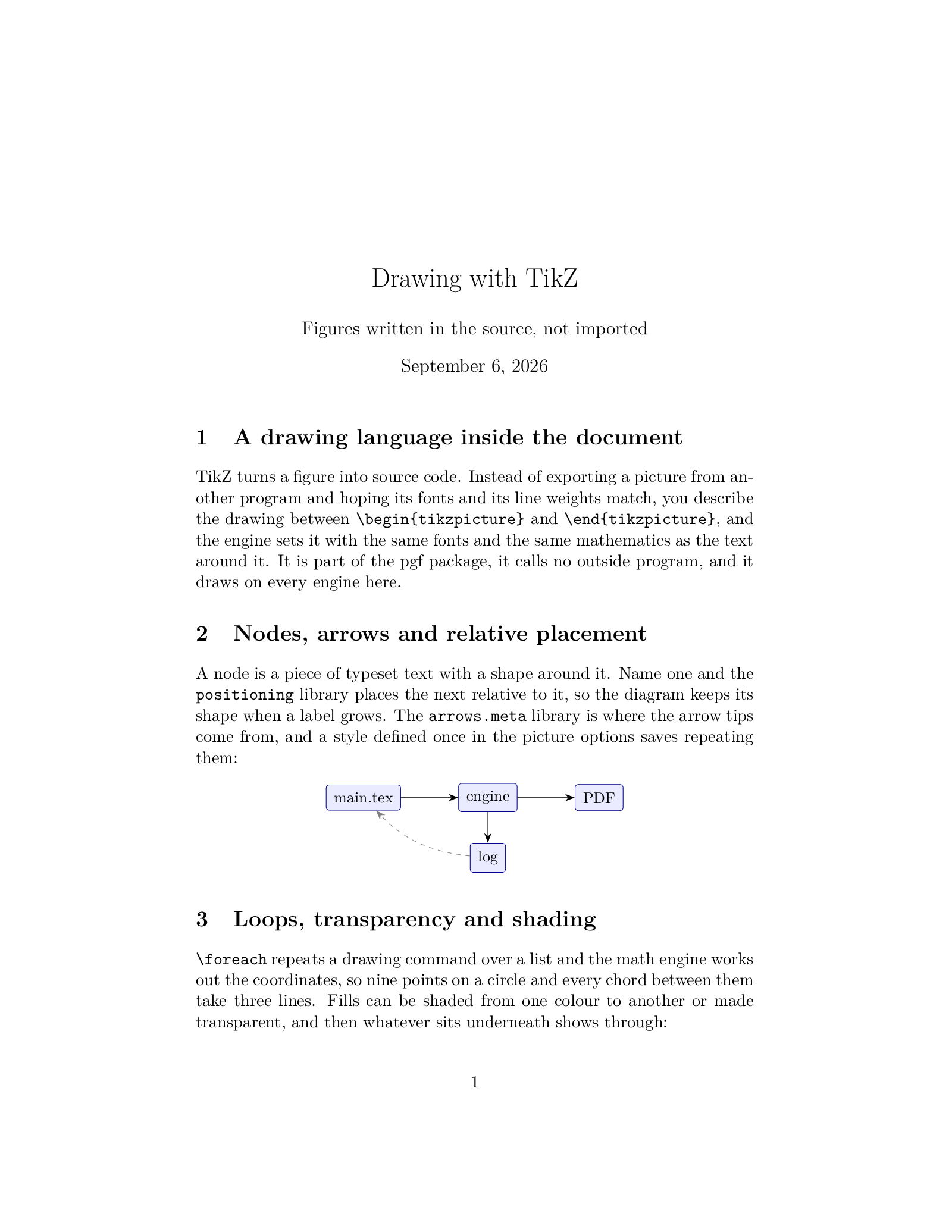
Open in LaTeX.to Download the example (zip)
- Recommended Active, 2005
- Engines: pdfLaTeX, XeLaTeX, LuaLaTeX, LaTeX, LaTeX (dvipdfmx), pdfTeX, XeTeX, LuaTeX, ConTeXt, pLaTeX, upLaTeX and ConTeXt (MkIV).
- Recommended engine: pdfLaTeX.
- Magic comment:
% !TeX program = pdflatexon the first line of main.tex, which is how the example picks it under Auto. - License: Public domain, use freely.
- Files:
main.tex
% !TeX program = pdflatex
\documentclass[11pt]{article}
\usepackage[T1]{fontenc}
\usepackage{lmodern}
\usepackage{tikz}
\usetikzlibrary{arrows.meta,positioning}
\usepackage{pgfplots}
\pgfplotsset{compat=1.18}

\title{Drawing with TikZ}
\author{Figures written in the source, not imported}
\date{\today}

\begin{document}
\maketitle

\section{A drawing language inside the document}
TikZ turns a figure into source code. Instead of exporting a picture from
another program and hoping its fonts and its line weights match, you describe
the drawing between \verb|\begin{tikzpicture}| and \verb|\end{tikzpicture}|,
and the engine sets it with the same fonts and the same mathematics as the text
around it. It is part of the pgf package, it calls no outside program, and it
draws on every engine here.

\section{Nodes, arrows and relative placement}
A node is a piece of typeset text with a shape around it. Name one and the
\texttt{positioning} library places the next relative to it, so the diagram
keeps its shape when a label grows. The \texttt{arrows.meta} library is where
the arrow tips come from, and a style defined once in the picture options
saves repeating them:

\begin{center}
\begin{tikzpicture}[
    node distance=7mm and 13mm,
    box/.style={draw=blue!55!black, fill=blue!8, rounded corners=2pt, inner sep=5pt, font=\small},
    arr/.style={-{Stealth[length=2.2mm]}}]
  \node[box] (src) {main.tex};
  \node[box, right=of src] (engine) {engine};
  \node[box, right=of engine] (pdf) {PDF};
  \node[box, below=of engine] (log) {log};
  \draw[arr] (src) -- (engine);
  \draw[arr] (engine) -- (pdf);
  \draw[arr] (engine) -- (log);
  \draw[arr, dashed, gray] (log) to[bend left=20] (src);
\end{tikzpicture}
\end{center}

\section{Loops, transparency and shading}
\verb|\foreach| repeats a drawing command over a list and the math engine works
out the coordinates, so nine points on a circle and every chord between them
take three lines. Fills can be shaded from one colour to another or made
transparent, and then whatever sits underneath shows through:

\begin{center}
\begin{tikzpicture}[scale=0.9]
  \foreach \i in {0,...,8} {\coordinate (P\i) at ({40*\i}:1.9);}
  \foreach \i in {0,...,8} {\foreach \j in {0,...,8} {\draw[blue!30] (P\i) -- (P\j);}}
  \foreach \i in {0,...,8} {\fill[blue!60!black] (P\i) circle (1.5pt);}
  \begin{scope}[xshift=5.6cm]
    \shade[left color=orange!70, right color=red!55] (-1.9,-1.6) rectangle (1.9,0.3);
    \fill[green!55!black, opacity=0.55] (-0.9,-0.9) circle (1);
    \fill[blue!60, opacity=0.55] (0.5,-0.5) circle (1);
  \end{scope}
\end{tikzpicture}
\end{center}

\section{Plots from a formula or a table}
\texttt{pgfplots} builds on TikZ and takes over the axes, the ticks, the grid
and the legend. The curves below are formulas, sampled by the engine while the
page is set; the same axis reads a column of numbers from a file just as
happily, which is what makes a plot as easy to revise as a paragraph.

\begin{center}
\begin{tikzpicture}
\begin{axis}[
    width=11cm, height=5.4cm, grid=both, grid style={gray!25},
    xlabel={$x$}, ylabel={$y$}, domain=0:6.3, samples=90,
    legend style={font=\small, at={(0.98,0.96)}, anchor=north east}]
  \addplot[thick, blue] {sin(deg(x))};
  \addlegendentry{$\sin x$}
  \addplot[thick, red, dashed] {exp(-x/3)*cos(deg(2*x))};
  \addlegendentry{$e^{-x/3}\cos 2x$}
\end{axis}
\end{tikzpicture}
\end{center}

\end{document}
How to draw with TikZ on LaTeX.to
Everything runs in your browser: nothing to install, no login, no compile timeout.
- Click Open in LaTeX.to. The example opens as a project with main.tex in the editor and its finished PDF in the preview.
- Edit, then press Ctrl+Enter (Cmd+Enter on a Mac). The first compile downloads what this engine needs; after that a compile takes seconds.
- The Preview menu has Download image, which crops one figure out of the page and saves it as a PNG.
What TikZ is
TikZ is a drawing language you write inside the document. A picture is source code between \begin{tikzpicture} and \end{tikzpicture}, so it comes out in the document's own fonts and its own mathematics, and there is no image file to keep in sync when a label changes. It ships as part of pgf, calls no outside program, and pgfplots builds function and data plots on top of it. Styles are defined once and reused, coordinates can be computed, and a figure ends up as easy to revise as a paragraph.
Which engines render it
Every engine on this site draws TikZ.
- The PDF writers, pdfLaTeX, XeLaTeX and LuaLaTeX: everything works, shadings, opacity and blend modes included.
- The two DVI routes, LaTeX through pgf's dvips driver, which it picks by itself, and LaTeX (dvipdfmx), which must be told: put
\def\pgfsysdriver{pgfsys-dvipdfmx.def}before\usepackage{tikz}or give the class thedvipdfmxoption, or the document compiles with the picture silently missing. Shadings and opacity come out on both. - Plain TeX on pdfTeX, XeTeX and LuaTeX with
\input tikz.tex, both ConTeXt flavours with\usemodule[tikz], and the Japanese engines pLaTeX and upLaTeX through dvipdfmx, named the same way.
Which engine to use
pdfLaTeX, unless the document needs something else. It compiles fastest, and nearly every TikZ example you will find was written for it. Move to LuaLaTeX when a big pgfplots figure runs out of memory, since it grows its memory as it goes, or when you want to compute the figure's data in Lua. Use XeLaTeX when the text around the picture needs fontspec fonts. The TikZ template is a document with four figures ready to copy from.
TikZ vs PSTricks
PSTricks is the other drawing language, and it draws in PostScript, so it needs the LaTeX, XeLaTeX or LuaLaTeX route. TikZ runs everywhere, and it is where a new figure should start. TikZ vs PSTricks is the long answer.
More engines: PSTricks and all engines. Compare: TikZ vs PSTricks.