PSTricks online
Compile PSTricks online in your browser: the drawings go out as PostScript and Ghostscript renders them, with every pst package already installed.
Open in LaTeX.to Download the example (zip)
- Maintained, 1993
- Engines: LaTeX, XeLaTeX and LuaLaTeX.
- Recommended engine: LaTeX.
- Magic comment:
% !TeX program = latexon the first line of main.tex, which is how the example picks it under Auto. - License: Public domain, use freely.
- Files:
main.tex
% !TeX program = latex
\documentclass[11pt]{article}
\usepackage{pstricks}
\usepackage{pst-plot}
\usepackage{pst-node}
\usepackage{pst-tree}
\usepackage{pst-grad}

\title{Drawing with PSTricks}
\author{Figures written in PostScript itself}
\date{\today}

\begin{document}
\maketitle

\section{The drawing language under the page}
PSTricks does not draw while TeX runs. It writes PostScript into the DVI file,
dvips carries it through, and Ghostscript executes it when the PDF is made.
That is why this document names the LaTeX route on its first line, and why a
curve can be handed over as an expression: the arithmetic happens in
PostScript, at the last possible moment.

\section{Function plots}
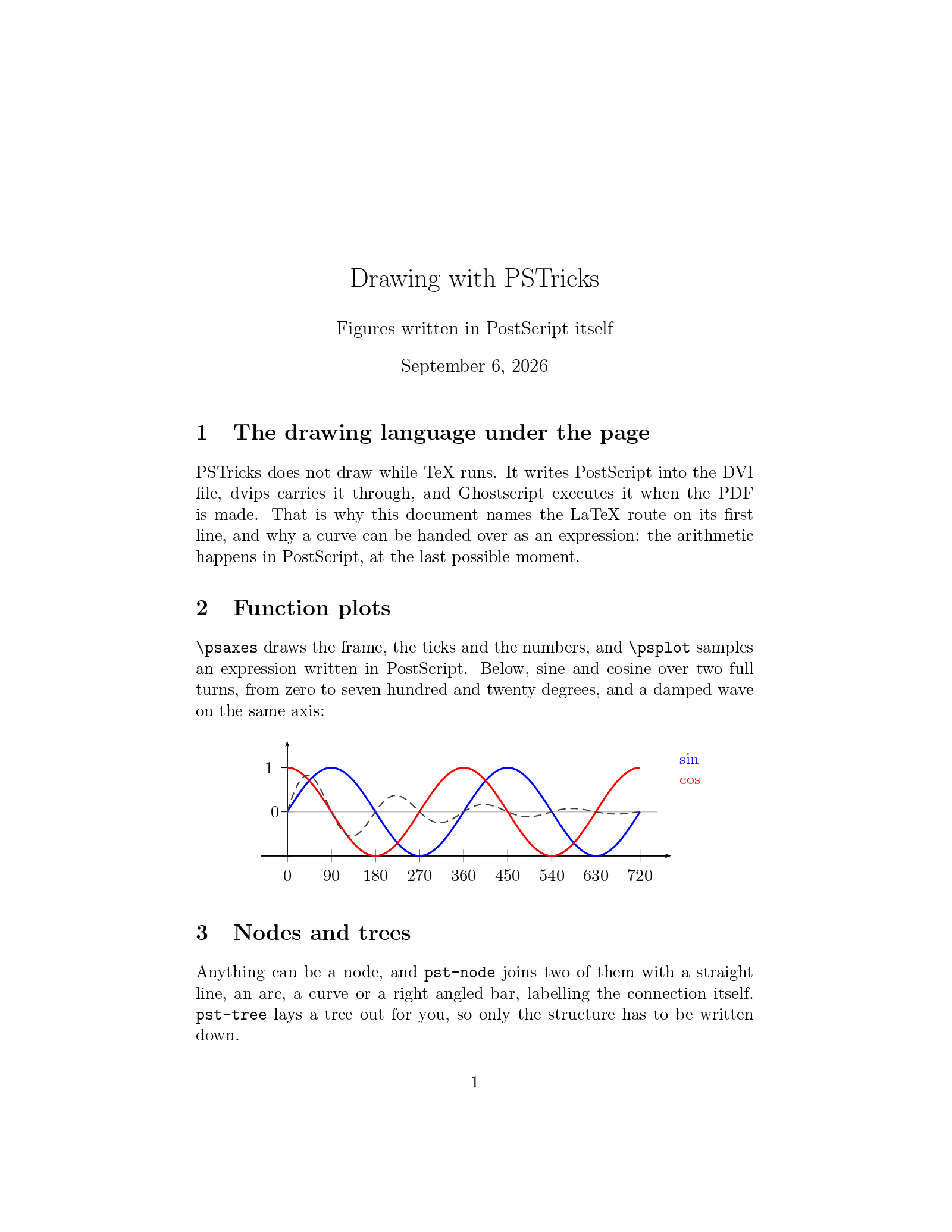
\verb|\psaxes| draws the frame, the ticks and the numbers, and \verb|\psplot|
samples an expression written in PostScript. Below, sine and cosine over two
full turns, from zero to seven hundred and twenty degrees, and a damped wave on
the same axis:

\begin{center}
\begin{pspicture}(-0.9,-1.7)(9.4,1.8)
  \psaxes[Ox=0,Oy=-1,Dx=90,dx=1,Dy=1,dy=1,linewidth=0.6pt]{->}(0,-1)(-0.6,-1)(8.7,1.6)
  \psline[linecolor=lightgray,linewidth=0.6pt](0,0)(8.4,0)
  \rput[r](-0.18,0){0}
  \psplot[linecolor=blue,linewidth=1.2pt,plotpoints=400]{0}{8}{x 90 mul sin}
  \psplot[linecolor=red,linewidth=1.2pt,plotpoints=400]{0}{8}{x 90 mul cos}
  \psplot[linecolor=darkgray,linestyle=dashed,plotpoints=400]{0}{8}{x 180 mul sin 2.71828 x 0.4 mul neg exp mul}
  \rput[l](8.9,1.2){\small\color{blue}$\sin$}
  \rput[l](8.9,0.7){\small\color{red}$\cos$}
\end{pspicture}
\end{center}

\section{Nodes and trees}
Anything can be a node, and \texttt{pst-node} joins two of them with a straight
line, an arc, a curve or a right angled bar, labelling the connection itself.
\texttt{pst-tree} lays a tree out for you, so only the structure has to be
written down.

\begin{center}
\begin{pspicture}(0,-0.4)(9.6,3.4)
  \rput(1,2.6){\circlenode{n1}{A}}
  \rput(4.8,2.6){\circlenode{n2}{B}}
  \rput(8.6,2.6){\circlenode{n3}{C}}
  \rput(1,0.5){\circlenode{n4}{D}}
  \rput(4.8,0.5){\rnode{n5}{\psframebox[fillstyle=solid,fillcolor=cyan!20]{E}}}
  \rput(8.6,0.5){\rnode{n6}{\psframebox[fillstyle=solid,fillcolor=yellow!30,framearc=0.4]{F}}}
  \ncline{->}{n1}{n2}\naput{\small ncline}
  \ncarc[arcangle=40]{->}{n2}{n3}\naput{\small ncarc}
  \nccurve[angleA=-90,angleB=150,linecolor=blue]{->}{n1}{n5}\ncput*{\small nccurve}
  \ncbar[angle=-90,linecolor=red]{->}{n4}{n5}\ncput*{\small ncbar}
  \ncline[linecolor=darkgray]{->}{n3}{n6}
\end{pspicture}
\end{center}

\begin{center}
\pstree[levelsep=1cm,treesep=0.7cm,nodesep=2pt]{\TR{\textbf{article}}}{%
  \pstree{\TR{front matter}}{\TR{title}\TR{abstract}}
  \pstree{\TR{body}}{\TR{sections}\TR{figures}}
  \TR{bibliography}
}
\end{center}

\section{Fills you can see through}
Gradients come from \texttt{pst-grad}, the overlapping shapes use the
\texttt{opacity} key, which Ghostscript renders, and \verb|\psgrid| puts the
coordinate system on the page while a drawing is being placed:

\begin{center}
\begin{pspicture}(0,0)(10,3.6)
  \psgrid[subgriddiv=0,gridcolor=lightgray,gridlabels=0pt](0,0)(10,3.6)
  \psframe[fillstyle=gradient,gradbegin=blue,gradend=white,gradangle=30,linewidth=0.4pt](0.4,0.4)(3.2,3.2)
  \pscircle[fillstyle=solid,fillcolor=red,opacity=0.5,linewidth=0.4pt](4.7,1.8){1.1}
  \psframe[fillstyle=solid,fillcolor=green,opacity=0.5,linewidth=0.4pt](5.1,0.7)(7.1,2.9)
  \rput{25}(8.6,1.8){\psellipse[fillstyle=solid,fillcolor=orange,opacity=0.6](0,0)(1.2,0.7)}
\end{pspicture}
\end{center}

\end{document}
How to draw with PSTricks on LaTeX.to
Everything runs in your browser: nothing to install, no login, no compile timeout.
- Click Open in LaTeX.to. The example opens as a project with main.tex in the editor and its finished PDF in the preview.
- Edit, then press Ctrl+Enter (Cmd+Enter on a Mac). The first compile downloads what this engine needs; after that a compile takes seconds.
- The Preview menu has Download image, which crops one figure out of the page and saves it as a PNG.
What PSTricks is
PSTricks draws in PostScript. A \psplot or a \pstree is not turned into a picture while TeX runs: it becomes PostScript in the output, and the arithmetic happens later, when a PostScript interpreter reads it. That is where its function plots, its node connections and its see-through fills come from, and it is also why it cares which route makes the PDF. Thirty years of pst- packages sit on top of it, for trees, geometry, circuits, chemistry, optics and much more.
Which engines render it
- LaTeX, the route it was written for: latex, then dvips, then one Ghostscript run for the whole document. The reference implementation, the fastest of the three, and what every
pst-package targets. - XeLaTeX, where xdvipdfmx converts each drawn object through a Ghostscript process of its own. It works, and it is slow: reckon on a couple of seconds per object, so a page with ten drawings on it takes half a minute.
- LuaLaTeX, through
luapstricks, which reimplements the PostScript in Lua and runs no Ghostscript at all. Quick, and it covers mostpst-packages, though not every one: in our tests theopacitykey was ignored, so fills came out solid, and a\psbeziercurve was left out. - pdfLaTeX cannot. It has no PostScript interpreter, and the usual way around that,
auto-pst-pdf, shells out to the other programs, which no browser can do.
Which engine to use
LaTeX, the first of the three. It renders every package, and the two page example on this page compiles in about ten seconds. Take XeLaTeX only when the same document also needs fontspec fonts, and LuaLaTeX when you would rather skip Ghostscript. The PSTricks template is a document with four figures ready to copy from.
PSTricks vs TikZ
TikZ is the other drawing language. It renders on every engine here, and it is where a new figure should start. Keep PSTricks for a document that already uses it, for a pst- package with no TikZ equivalent, or when you want to write the PostScript yourself. TikZ vs PSTricks compares them properly.
More engines: TikZ and all engines. Compare: TikZ vs PSTricks.