XeLaTeX online
Compile XeLaTeX online without installing anything: fontspec, Unicode text and OpenType fonts, all running in your browser.
Open in LaTeX.to Download the example (zip)
- Unmaintained, 2004
- Magic comment:
% !TeX program = xelatexon the first line of main.tex, which is how the example picks it under Auto. - License: Public domain, use freely.
- Files:
main.tex
% !TeX program = xelatex
\documentclass[11pt]{article}
\usepackage{fontspec}
\setmainfont{TeX Gyre Pagella}
\setsansfont{TeX Gyre Heros}
\setmonofont{TeX Gyre Cursor}

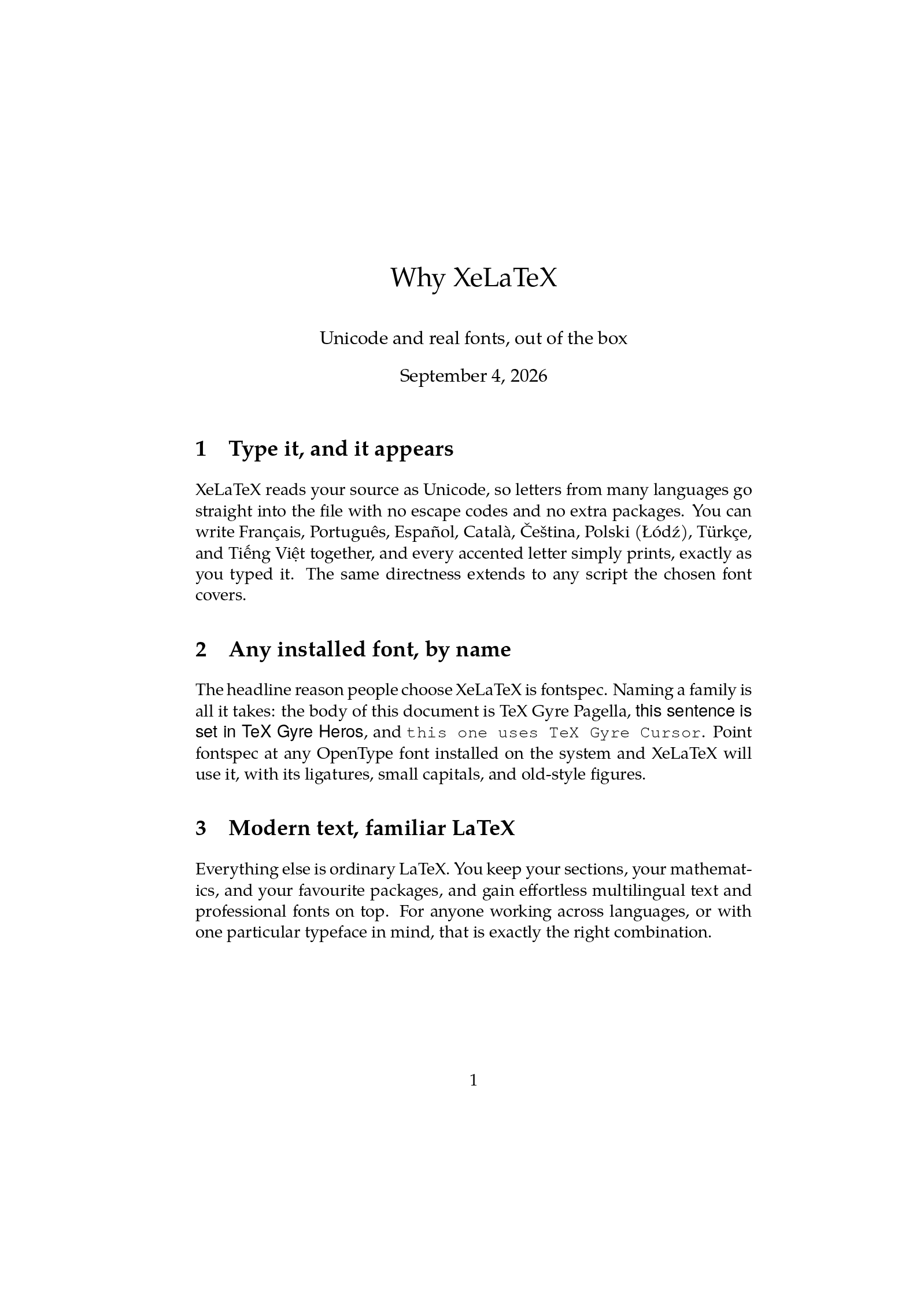
\title{Why XeLaTeX}
\author{Unicode and real fonts, out of the box}
\date{\today}

\begin{document}
\maketitle

\section{Type it, and it appears}
XeLaTeX reads your source as Unicode, so letters from many languages go
straight into the file with no escape codes and no extra packages. You can
write Français, Português, Español, Català, Čeština, Polski (Łódź), Türkçe, and
Tiếng Việt together, and every accented letter simply prints, exactly as you
typed it. The same directness extends to any script the chosen font covers.

\section{Any installed font, by name}
The headline reason people choose XeLaTeX is fontspec. Naming a family is all
it takes: the body of this document is TeX Gyre Pagella, {\sffamily this
sentence is set in TeX Gyre Heros}, and {\ttfamily this one uses TeX Gyre
Cursor}. Point fontspec at any OpenType font installed on the system and
XeLaTeX will use it, with its ligatures, small capitals, and old-style figures.

\section{Modern text, familiar LaTeX}
Everything else is ordinary LaTeX. You keep your sections, your mathematics,
and your favourite packages, and gain effortless multilingual text and
professional fonts on top. For anyone working across languages, or with one
particular typeface in mind, that is exactly the right combination.

\end{document}
How to compile with XeLaTeX on LaTeX.to
Everything runs in your browser: nothing to install, no login, no compile timeout.
- Click Open in LaTeX.to. The example opens as a project with main.tex in the editor and its finished PDF in the preview.
- Edit, then press Ctrl+Enter (Cmd+Enter on a Mac). The first compile downloads what this engine needs; after that a compile takes seconds.
What XeLaTeX is
XeLaTeX is the XeTeX engine with the LaTeX format loaded. It exists for two things. It reads your file as Unicode, so any character your font can draw goes straight into the source, Čeština, Tiếng Việt, Ελληνικά, without escape codes. And it loads fonts by name: one line, \setmainfont{TeX Gyre Pagella}, and the whole document is set in that face, ligatures and small capitals included.
It does not write the PDF itself. It writes an extended DVI file, XDV, and the xdvipdfmx driver turns that into the PDF in the same run. You never see the step, but it is why a few pdfTeX-only packages complain.
When to use it
- A specific typeface, yours or one of the OpenType fonts inside TeX Live, through the
fontspecpackage the example is built on. - A popular template from GitHub that names its fonts: the Deedy Resume and Awesome-CV both need XeLaTeX, and Auto picks it for them from the
fontspecline in their classes. - Text that mixes scripts, or a language that 8-bit encodings cannot hold.
- Arabic, Persian and other right-to-left scripts through
polyglossiaandbidi, where XeLaTeX is still the most polished. - Not for a new document with no legacy to protect: the XeTeX engine is no longer developed, and the LaTeX team points new work at LuaLaTeX, which takes the same
fontspeccommands.
XeLaTeX vs pdfLaTeX vs LuaLaTeX
- pdfLaTeX: faster, works with every journal template, knows only 8-bit fonts.
- LuaLaTeX: the same Unicode and the same fonts, writes PDF directly, adds a scripting language and tagged PDFs.
- XeLaTeX: sits between them, the easiest way to a real font today and the weakest bet for the years ahead.
The details are on pdfLaTeX vs XeLaTeX vs LuaLaTeX.
"xelatex not found on path"
Jupyter's PDF export (nbconvert --to pdf) and pandoc both shell out to xelatex, and this is what they say when no TeX is installed. Instead of a multi-gigabyte install:
- Have nbconvert write LaTeX instead:
--to latex. - Open that
.texfile here, with the images it references. - Compile. The document already loads
fontspec, so Auto picks XeLaTeX by itself.
More engines: LuaLaTeX, pdfLaTeX, LaTeX, LaTeX (dvipdfmx) and all engines. Compare: pdfLaTeX vs XeLaTeX vs LuaLaTeX.