LuaLaTeX online
Compile LuaLaTeX online in your browser, with Lua running inside the typesetting pass and OpenType fonts picked by name.
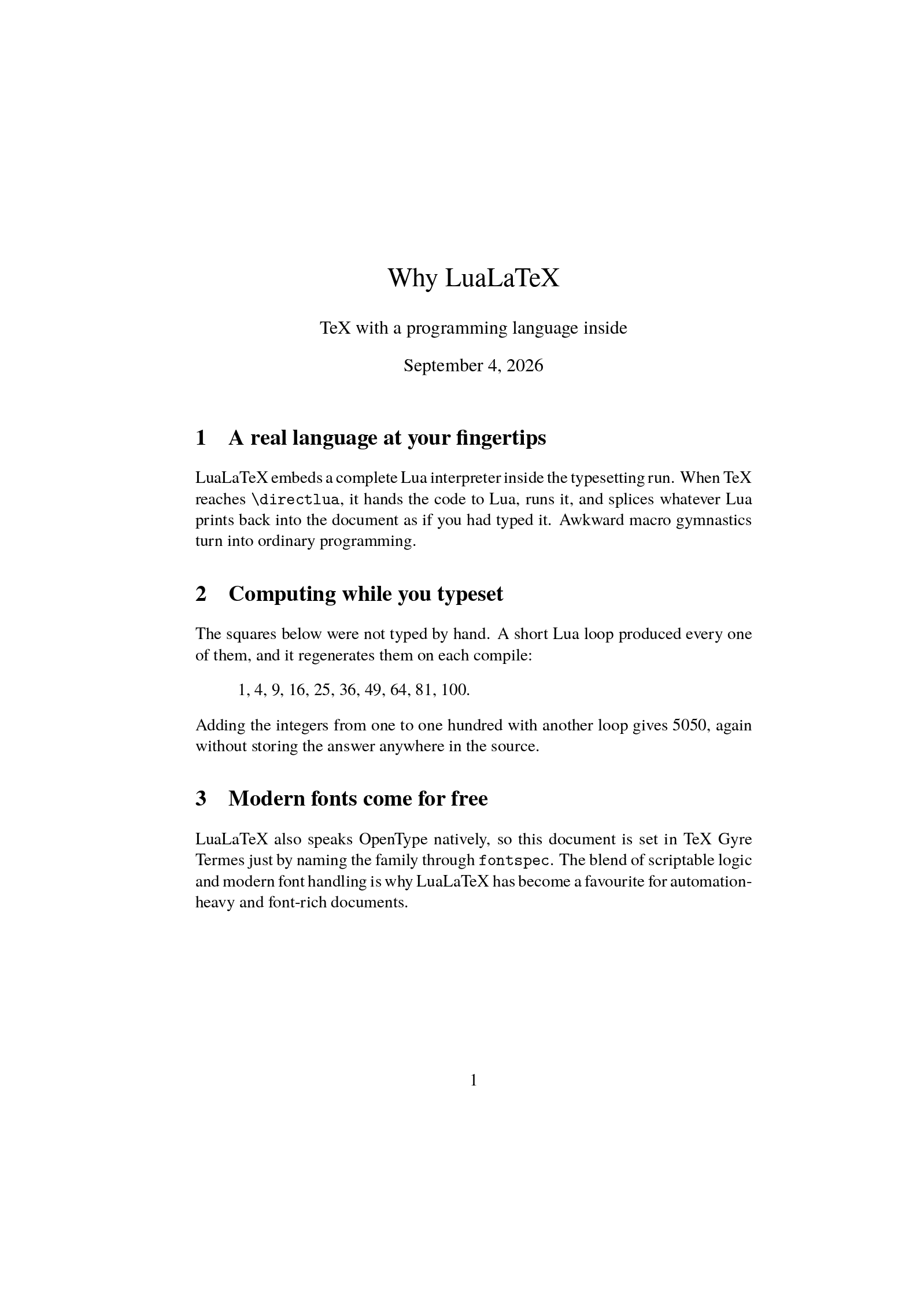
Open in LaTeX.to Download the example (zip)
- Recommended Active, 2007
- Magic comment:
% !TeX program = lualatexon the first line of main.tex, which is how the example picks it under Auto. - License: Public domain, use freely.
- Files:
main.tex
% !TeX program = lualatex
\documentclass[11pt]{article}
\usepackage{fontspec}
\setmainfont{TeX Gyre Termes}

\title{Why LuaLaTeX}
\author{TeX with a programming language inside}
\date{\today}

\begin{document}
\maketitle

\section{A real language at your fingertips}
LuaLaTeX embeds a complete Lua interpreter inside the typesetting run. When TeX
reaches \verb|\directlua|, it hands the code to Lua, runs it, and splices
whatever Lua prints back into the document as if you had typed it. Awkward macro
gymnastics turn into ordinary programming.

\section{Computing while you typeset}
The squares below were not typed by hand. A short Lua loop produced every one
of them, and it regenerates them on each compile:
\begin{quote}
\directlua{
  local sq = {}
  for n = 1, 10 do sq[n] = n * n end
  tex.print(table.concat(sq, ", "))
}.
\end{quote}
Adding the integers from one to one hundred with another loop gives
\directlua{
  local s = 0
  for k = 1, 100 do s = s + k end
  tex.print(s)
}, again without storing the answer anywhere in the source.

\section{Modern fonts come for free}
LuaLaTeX also speaks OpenType natively, so this document is set in TeX Gyre
Termes just by naming the family through \verb|fontspec|. The blend of
scriptable logic and modern font handling is why LuaLaTeX has become a
favourite for automation-heavy and font-rich documents.

\end{document}
How to compile with LuaLaTeX on LaTeX.to
Everything runs in your browser: nothing to install, no login, no compile timeout.
- Click Open in LaTeX.to. The example opens as a project with main.tex in the editor and its finished PDF in the preview.
- Edit, then press Ctrl+Enter (Cmd+Enter on a Mac). The first compile downloads what this engine needs; after that a compile takes seconds.
What LuaLaTeX is
LuaLaTeX is the LuaTeX engine with the LaTeX format loaded. LuaTeX embeds Lua, a small scripting language, inside TeX: wherever the document says \directlua, the code runs in the middle of the typesetting pass and whatever it prints is set on the page. Around that it is a Unicode engine like XeLaTeX, loading OpenType fonts by name through fontspec and writing the PDF directly.
The example on this page computes its list of square numbers and the sum from one to a hundred with a four-line loop. None of those numbers is in the source.
When to use it
- A new document with no template to honor. Since November 2024 the LaTeX team recommends LuaLaTeX for new work, mainly because tagged, accessible PDFs need it.
- Fonts by name and text in any script, the same as XeLaTeX.
- Content computed during the compile: tables from data, figures from formulas, text from loops.
- Very large documents. LuaTeX allocates memory as it goes, so "TeX capacity exceeded" is far away.
- Japanese through
luatexja, the maintained Unicode route. - Not for a journal template written for pdfLaTeX, and not when you need the fastest possible compile: LuaLaTeX starts more slowly and builds a font cache the first time it meets a typeface.
LuaLaTeX vs pdfLaTeX vs XeLaTeX
- pdfLaTeX: the fast, universal default with 8-bit fonts.
- XeLaTeX: brought Unicode and real fonts first and still has the best right-to-left support, but its engine is no longer developed.
- LuaLaTeX: everything XeLaTeX has plus Lua, direct PDF output and accessibility, at the cost of a slower start.
The long version, with fonts, speed and how to move a document over, is on pdfLaTeX vs XeLaTeX vs LuaLaTeX.
More engines: pdfLaTeX, XeLaTeX, LaTeX, LaTeX (dvipdfmx) and all engines. Compare: pdfLaTeX vs XeLaTeX vs LuaLaTeX.