LaTeX (dvips) online
Run LaTeX (dvips) online: the PostScript route turns your source into DVI, then PostScript, then the PDF, so PSTricks, psfrag and EPS figures all render.
Open in LaTeX.to Download the example (zip)
- Maintained, 1984
- Magic comment:
% !TeX program = latexon the first line of main.tex, which is how the example picks it under Auto. - License: Public domain, use freely.
- Files:
main.tex
% !TeX program = latex
\documentclass[11pt]{article}
\usepackage[margin=2.5cm]{geometry}
\usepackage{graphicx}
\usepackage{psfrag}
\usepackage{xcolor}

\title{The PostScript Route to PDF}
\author{latex, then dvips, then Ghostscript}
\date{\today}

\begin{document}
\maketitle

\section{Three programs, one PDF}
Most engines write the PDF themselves. This one does not. The \textbf{latex}
program reads the source and writes a DVI file, \textbf{dvips} turns that DVI
into PostScript, and \textbf{Ghostscript} distills the PostScript into the PDF
you are reading. It is the oldest way to a finished page and still the only one
that runs PostScript on the way there.

Auto takes this route by itself when a document loads \texttt{pstricks}, any
\texttt{pst} package, \texttt{psfrag} or \texttt{auto-pst-pdf}. Nothing else
detects to it, so the first line of this file asks for it by name.

\section{An EPS figure, exactly as written}
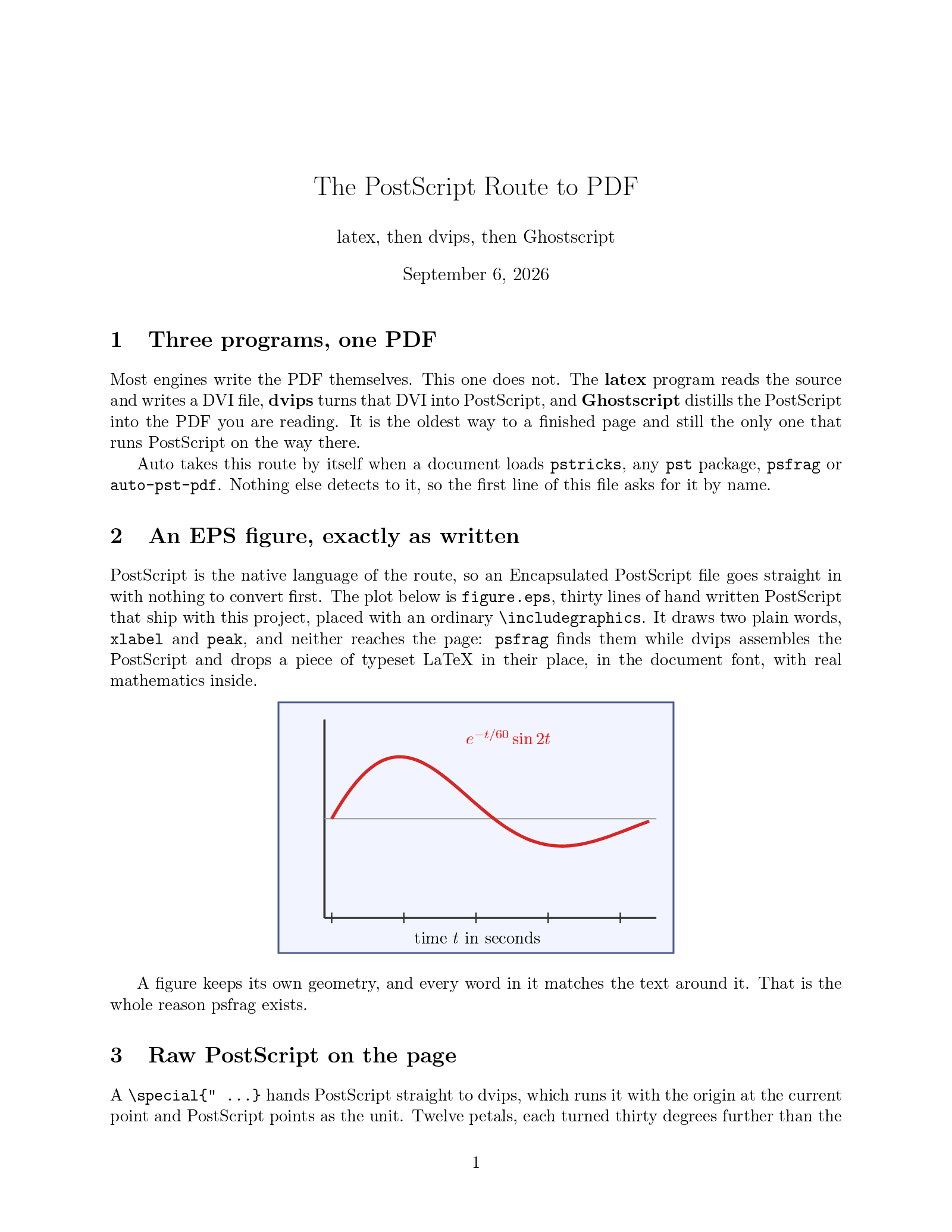
PostScript is the native language of the route, so an Encapsulated PostScript
file goes straight in with nothing to convert first. The plot below is
\texttt{figure.eps}, thirty lines of hand written PostScript that ship with
this project, placed with an ordinary \verb|\includegraphics|. It draws two
plain words, \texttt{xlabel} and \texttt{peak}, and neither reaches the page:
\texttt{psfrag} finds them while dvips assembles the PostScript and drops a
piece of typeset LaTeX in their place, in the document font, with real
mathematics inside.

\begin{center}
\psfrag{xlabel}[t][t]{time $t$ in seconds}
\psfrag{peak}[l][l]{\color{red}$e^{-t/60}\sin 2t$}
\includegraphics[width=9cm]{figure.eps}
\end{center}

A figure keeps its own geometry, and every word in it matches the text around
it. That is the whole reason psfrag exists.

\section{Raw PostScript on the page}
A \verb|\special{" ...}| hands PostScript straight to dvips, which runs it with
the origin at the current point and PostScript points as the unit. Twelve
petals, each turned thirty degrees further than the last and filled by hue:

\begin{center}
\vspace{1.9cm}%
\mbox{\special{" 0 1 11 { /i exch def 30 rotate i 12 div 0.8 0.95 sethsbcolor
  newpath 0 0 moveto 18 7 lineto 46 0 lineto 18 -7 lineto closepath fill } for}}%
\vspace{1.9cm}
\end{center}

Nothing else on this page needed PostScript, which is the point. The route is
ordinary LaTeX until the moment you want the drawing language underneath it.

\end{document}
figure.eps
%!PS-Adobe-3.0 EPSF-3.0
%%BoundingBox: 0 0 220 140
%%Title: figure.eps, a hand written figure for the LaTeX route example
%%EndComments
gsave
0.95 0.96 1 setrgbcolor 0 0 220 140 rectfill
0.30 0.36 0.55 setrgbcolor 1 setlinewidth 0.5 0.5 219 139 rectstroke
0.2 setgray 1.2 setlinewidth
newpath 26 20 moveto 210 20 lineto stroke
newpath 26 20 moveto 26 130 lineto stroke
0.6 setgray 0.6 setlinewidth
newpath 26 75 moveto 210 75 lineto stroke
0.2 setgray 0.8 setlinewidth
30 40 210 { /x exch def newpath x 17 moveto x 23 lineto stroke } for
0.85 0.15 0.15 setrgbcolor 1.8 setlinewidth
newpath
0 2 176 {
  /t exch def
  /y t 2 mul sin 50 mul 2.71828 t 110 div neg exp mul 75 add def
  t 30 add y
  t 0 eq { moveto } { lineto } ifelse
} for
stroke
0 setgray /Helvetica findfont 10 scalefont setfont
98 5 moveto (xlabel) show
104 118 moveto (peak) show
grestore
showpage
How to compile with LaTeX on LaTeX.to
Everything runs in your browser: nothing to install, no login, no compile timeout.
- Click Open in LaTeX.to. The example opens as a project with main.tex in the editor and its finished PDF in the preview.
- Edit, then press Ctrl+Enter (Cmd+Enter on a Mac). The first compile downloads what this engine needs; after that a compile takes seconds.
What the LaTeX route is
latex does not write a PDF. It writes a DVI file, dvips turns that into PostScript, and one Ghostscript run distills the PostScript into the PDF you download. Three programs, one click here. It is the oldest complete route to a finished page, it is what Overleaf's "LaTeX" compiler setting runs, and it is the only route on this site that can execute PostScript on the way.
Auto picks it by itself when a document loads pstricks, any pst- package, psfrag or auto-pst-pdf, since none of those draw anywhere else. Nothing else detects to it, so in any other document the first line, % !TeX program = latex, is what asks for it.
When to use it
- PSTricks drawings, in any of the
pst-packages. This is the reference implementation, and one Ghostscript run covers the whole document. psfraglabels, where a piece of typeset LaTeX replaces a word inside an EPS figure, as the example on this page does.- EPS figures included as they are, and raw PostScript handed to the page with
\special. - A document, class or Makefile written for dvips.
- Not for anything else. pdfLaTeX writes the PDF in one pass and is faster.
What works and what does not
- Fonts are the classic Type 1 ones.
fontspecand OpenType fonts by name need XeLaTeX or LuaLaTeX. - EPS and PostScript go in as they are. A PNG or a JPEG has to be converted first, or take the LaTeX (dvipdfmx) route, which includes both.
hyperrefwants itsdvipsoption, andgraphicxandxcolortake the driver from the same place.- Transparency, gradients and shading are Ghostscript's work here, and it does them.
LaTeX vs pdfLaTeX
Same source, same packages, different last mile. pdfLaTeX writes the PDF itself, in one pass, with microtypography, and cannot run a line of PostScript. This route spends two more programs and gains PSTricks, psfrag and EPS. If the document needs none of those, use pdfLaTeX; if it draws in PostScript, use this one, and TikZ vs PSTricks is the longer answer to which drawing language to write in.
More engines: LuaLaTeX, pdfLaTeX, XeLaTeX, LaTeX (dvipdfmx) and all engines.