pdfLaTeX online
Run pdfLaTeX online in your browser: the whole TeX Live compiles on your own machine, so there is nothing to install and nothing to upload.
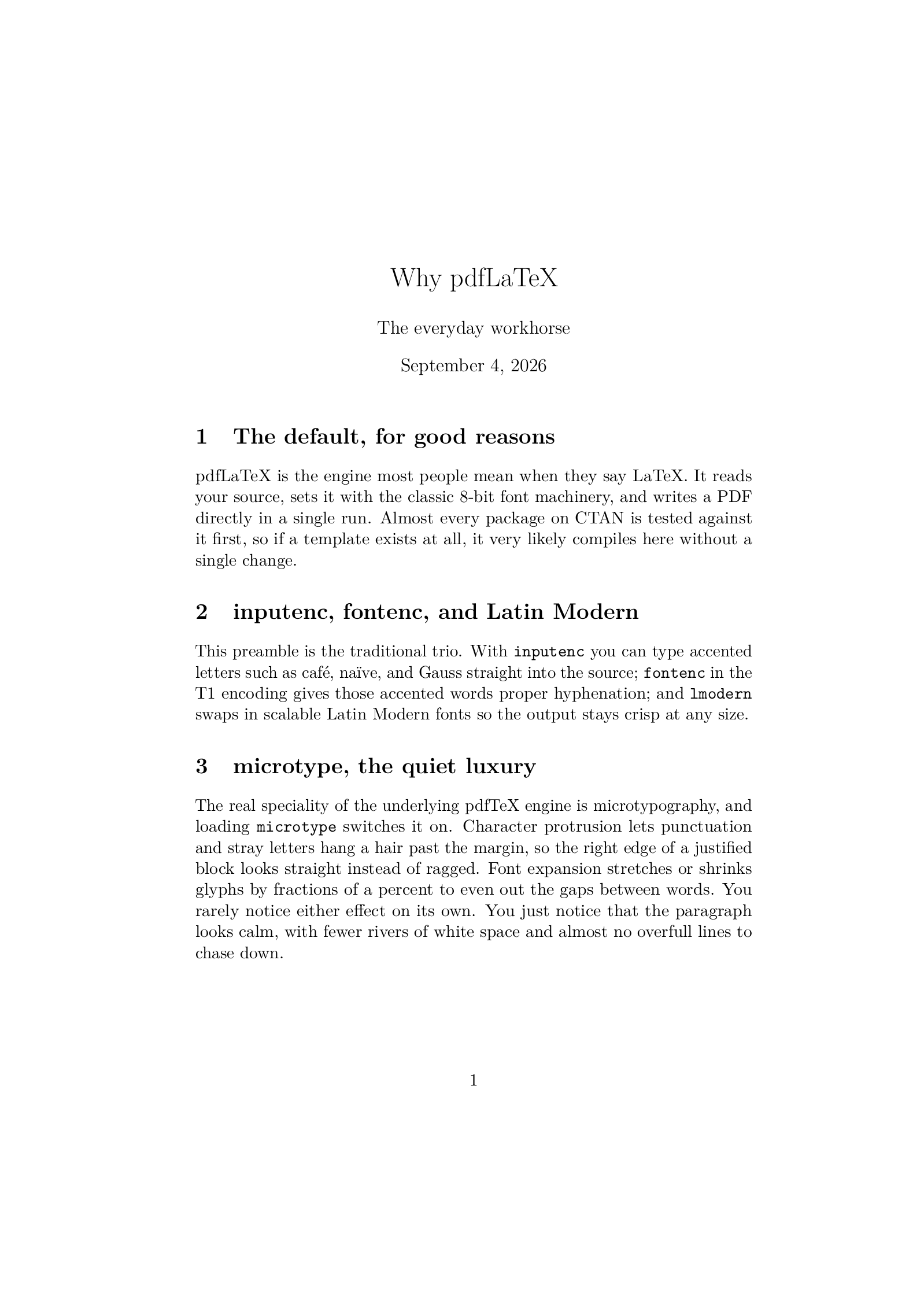
Open in LaTeX.to Download the example (zip)
- Recommended Maintained, 1997
- Magic comment:
% !TeX program = pdflatexon the first line of main.tex, which is how the example picks it under Auto. - License: Public domain, use freely.
- Files:
main.tex
% !TeX program = pdflatex
\documentclass[11pt]{article}
\usepackage[T1]{fontenc}
\usepackage[utf8]{inputenc}
\usepackage{lmodern}
\usepackage{microtype}

\title{Why pdfLaTeX}
\author{The everyday workhorse}
\date{\today}

\begin{document}
\maketitle

\section{The default, for good reasons}
pdfLaTeX is the engine most people mean when they say LaTeX. It reads your
source, sets it with the classic 8-bit font machinery, and writes a PDF
directly in a single run. Almost every package on CTAN is tested against it
first, so if a template exists at all, it very likely compiles here without a
single change.

\section{inputenc, fontenc, and Latin Modern}
This preamble is the traditional trio. With \texttt{inputenc} you can type
accented letters such as café, naïve, and Gauss straight into the source;
\texttt{fontenc} in the T1 encoding gives those accented words proper
hyphenation; and \texttt{lmodern} swaps in scalable Latin Modern fonts so the
output stays crisp at any size.

\section{microtype, the quiet luxury}
The real speciality of the underlying pdfTeX engine is microtypography, and
loading \texttt{microtype} switches it on. Character protrusion lets
punctuation and stray letters hang a hair past the margin, so the right edge
of a justified block looks straight instead of ragged. Font expansion stretches
or shrinks glyphs by fractions of a percent to even out the gaps between words.
You rarely notice either effect on its own. You just notice that the paragraph
looks calm, with fewer rivers of white space and almost no overfull lines to
chase down.

\section{Fast and predictable}
Because it emits PDF in one pass and needs nothing exotic, pdfLaTeX is quick
and dependable. For a paper, a report, or a thesis built from standard
packages, it is usually the right first choice, which is exactly why journals
and publishers keep it as their default.

\end{document}
How to compile with pdfLaTeX on LaTeX.to
Everything runs in your browser: nothing to install, no login, no compile timeout.
- Click Open in LaTeX.to. The example opens as a project with main.tex in the editor and its finished PDF in the preview.
- Edit, then press Ctrl+Enter (Cmd+Enter on a Mac). The first compile downloads what this engine needs; after that a compile takes seconds.
What pdfLaTeX is
pdfLaTeX is the pdfTeX engine with the LaTeX format loaded: Knuth's TeX plus a PDF writer, running the macros almost everyone means when they say "LaTeX". It reads your file, sets the pages with the classic 8-bit fonts, and writes the PDF in one run. Every package on CTAN was tested against it first, every journal class assumes it, and every answer on the internet was written with it in mind.
The example on this page is a plain article with the traditional preamble (inputenc, fontenc, lmodern) and microtype switched on, which is the one thing pdfLaTeX does better than any other engine: protruding punctuation past the margin and stretching glyphs by fractions of a percent so justified text looks calm.
When to use it
- A journal or conference template. They are written for pdfLaTeX and often break in small ways elsewhere.
- Any Latin-script document with standard fonts, where you want the fastest compile and the fewest surprises.
- Anything that leans on
microtype. - Not for a specific typeface you own, or text in Greek, Cyrillic, Arabic or CJK: that is XeLaTeX or LuaLaTeX territory, and for a brand new document the LaTeX team now recommends LuaLaTeX.
pdfLaTeX vs XeLaTeX vs LuaLaTeX
Same document body, different preamble.
- pdfLaTeX: the fastest and the most compatible, 8-bit fonts only.
- XeLaTeX: Unicode text and OpenType fonts by name through
fontspec, engine no longer developed. - LuaLaTeX: the same fonts plus a scripting language inside the engine, and the only one that can tag a PDF for accessibility.
The full picture, with fonts, speed and how to switch, is on pdfLaTeX vs XeLaTeX vs LuaLaTeX.
Common errors
pdflatex: command not foundmeans no TeX is installed on that machine, under pandoc, Jupyter, R Markdown or a fresh Docker image. Nothing is installed here: paste the document or upload the folder and press Ctrl+Enter.pdfTeX error (font expansion): auto expansion is only possible with scalable fontsmeansmicrotypemet a bitmap font, almost always\usepackage[T1]{fontenc}without a scalable font behind it. Add\usepackage{lmodern}after it, as the example does.
More engines: LuaLaTeX, XeLaTeX, LaTeX, LaTeX (dvipdfmx) and all engines. Compare: pdfLaTeX vs XeLaTeX vs LuaLaTeX.