AltaCV LaTeX template
The AltaCV LaTeX template is LianTze Lim's two column CV class for a modern academic or industry resume with a photo, skill ratings and a publication list.
- Engine: pdfLaTeX
- Bibliography: biblatex (Biber)
- Source: liantze/AltaCV 1.6k 9137353 19 Sep 2026
- License: LPPL 1.3c
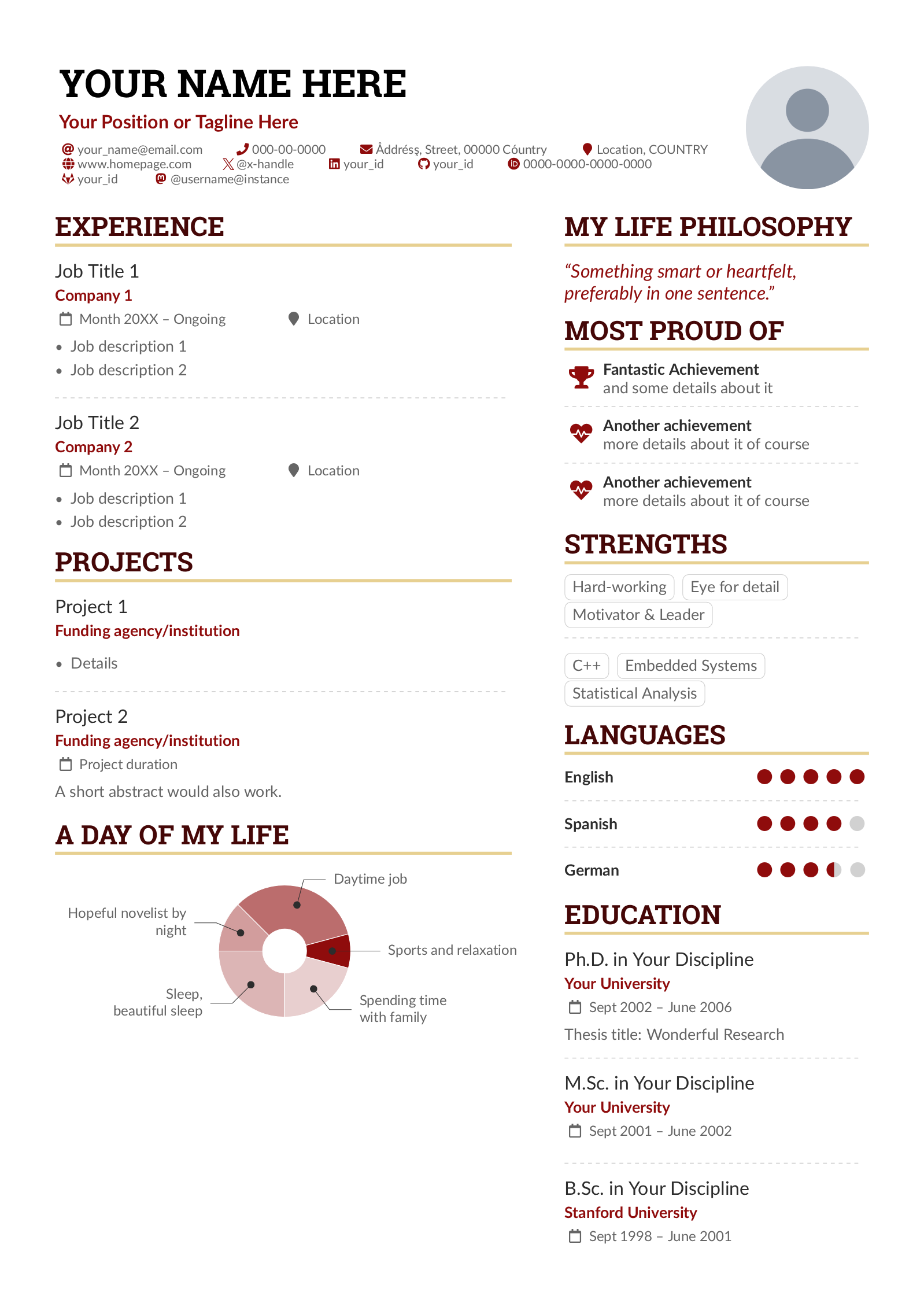
Open in LaTeX.to Download all files (zip)
sample.tex
% Modified for the LaTeX.to template catalogue, not the original file. The changes are listed in changes.txt.
%%%%%%%%%%%%%%%%%
% This is an sample CV template created using altacv.cls
% (v1.7.4, 30 July 2025) written by LianTze Lim ([email protected]). Compiles with pdfLaTeX, XeLaTeX and LuaLaTeX.
%
%% It may be distributed and/or modified under the
%% conditions of the LaTeX Project Public License, either version 1.3
%% of this license or (at your option) any later version.
%% The latest version of this license is in
%%    http://www.latex-project.org/lppl.txt
%% and version 1.3 or later is part of all distributions of LaTeX
%% version 2003/12/01 or later.
%%%%%%%%%%%%%%%%

%% Use the "normalphoto" option if you want a normal photo instead of cropped to a circle
% \documentclass[10pt,a4paper,withhyper,normalphoto]{altacv}

\documentclass[10pt,a4paper,withhyper]{altacv}
%% AltaCV uses the fontawesome5 and simpleicons packages.
%% See http://texdoc.net/pkg/fontawesome5 and http://texdoc.net/pkg/simpleicons for full list of symbols.

% Change the page layout if you need to
\geometry{left=1.25cm,right=1.25cm,top=1.5cm,bottom=1.5cm,columnsep=1.2cm}

% The paracol package lets you typeset columns of text in parallel
\usepackage{paracol}

% Change the font if you want to, depending on whether
% you're using pdflatex or xelatex/lualatex
% WHEN COMPILING WITH XELATEX PLEASE USE
% xelatex -shell-escape -output-driver="xdvipdfmx -z 0" sample.tex
\iftutex
  % If using xelatex or lualatex:
  \setmainfont{Roboto Slab}
  \setsansfont{Lato}
  \renewcommand{\familydefault}{\sfdefault}
\else
  % If using pdflatex:
  \usepackage[rm]{roboto}
  \usepackage[defaultsans]{lato}
  % \usepackage{sourcesanspro}
  \renewcommand{\familydefault}{\sfdefault}
\fi

% Change the colours if you want to
\definecolor{SlateGrey}{HTML}{2E2E2E}
\definecolor{LightGrey}{HTML}{666666}
\definecolor{DarkPastelRed}{HTML}{450808}
\definecolor{PastelRed}{HTML}{8F0D0D}
\definecolor{GoldenEarth}{HTML}{E7D192}
\colorlet{name}{black}
\colorlet{tagline}{PastelRed}
\colorlet{heading}{DarkPastelRed}
\colorlet{headingrule}{GoldenEarth}
\colorlet{subheading}{PastelRed}
\colorlet{accent}{PastelRed}
\colorlet{emphasis}{SlateGrey}
\colorlet{body}{LightGrey}

% Change some fonts, if necessary
\renewcommand{\namefont}{\Huge\rmfamily\bfseries}
\renewcommand{\personalinfofont}{\footnotesize}
\renewcommand{\cvsectionfont}{\LARGE\rmfamily\bfseries}
\renewcommand{\cvsubsectionfont}{\large\bfseries}


% Change the bullets for itemize and rating marker
% for \cvskill if you want to
\renewcommand{\cvItemMarker}{{\small\textbullet}}
\renewcommand{\cvRatingMarker}{\faCircle}
% ...and the markers for the date/location for \cvevent
% \renewcommand{\cvDateMarker}{\faCalendar*[regular]}
% \renewcommand{\cvLocationMarker}{\faMapMarker*}


% If your CV/résumé is in a language other than English,
% then you probably want to change these so that when you
% copy-paste from the PDF or run pdftotext, the location
% and date marker icons for \cvevent will paste as correct
% translations. For example Spanish:
% \renewcommand{\locationname}{Ubicación}
% \renewcommand{\datename}{Fecha}


%% Use (and optionally edit if necessary) this .tex if you
%% want to use an author-year reference style like APA(6)
%% for your publication list
% \input{pubs-authoryear.cfg}

%% Use (and optionally edit if necessary) this .tex if you
%% want an originally numerical reference style like IEEE
%% for your publication list
\input{pubs-num.cfg}

%% sample.bib contains your publications
\addbibresource{sample.bib}

\begin{document}
\name{Your Name Here}
\tagline{Your Position or Tagline Here}
%% You can add multiple photos on the left or right
\photoR{2.8cm}{placeholder-photo}
% \photoL{2.5cm}{Yacht_High,Suitcase_High}

\personalinfo{%
  % Not all of these are required!
  \email{[email protected]}
  \phone{000-00-0000}
  \mailaddress{Åddrésş, Street, 00000 Cóuntry}
  \location{Location, COUNTRY}
  \homepage{www.homepage.com}
  % \twitter{@twitterhandle}
  \xtwitter{@x-handle}
  \linkedin{your_id}
  \github{your_id}
  \orcid{0000-0000-0000-0000}
  %% You can add your own arbitrary detail with
  %% \printinfo{symbol}{detail}[optional hyperlink prefix]
  % \printinfo{\faPaw}{Hey ho!}[https://example.com/]

  %% Or you can declare your own field with
  %% \NewInfoFiled{fieldname}{symbol}[optional hyperlink prefix] and use it:
  \NewInfoField{gitlab}{\faGitlab}[https://gitlab.com/]
  \gitlab{your_id}
  %%
  %% For services and platforms like Mastodon where there isn't a
  %% straightforward relation between the user ID/nickname and the hyperlink,
  %% you can use \printinfo directly e.g.
  % \printinfo{\faMastodon}{@username@instace}[https://instance.url/@username]
  %% But if you absolutely want to create new dedicated info fields for
  %% such platforms, then use \NewInfoField* with a star:
  \NewInfoField*{mastodon}{\faMastodon}
  %% then you can use \mastodon, with TWO arguments where the 2nd argument is
  %% the full hyperlink.
  \mastodon{@username@instance}{https://instance.url/@username}
}

\makecvheader
%% Depending on your tastes, you may want to make fonts of itemize environments slightly smaller
% \AtBeginEnvironment{itemize}{\small}

%% Set the left/right column width ratio to 6:4.
\columnratio{0.6}

% Start a 2-column paracol. Both the left and right columns will automatically
% break across pages if things get too long.
\begin{paracol}{2}
\cvsection{Experience}

\cvevent{Job Title 1}{Company 1}{Month 20XX -- Ongoing}{Location}
\begin{itemize}
\item Job description 1
\item Job description 2
\end{itemize}

\divider

\cvevent{Job Title 2}{Company 2}{Month 20XX -- Ongoing}{Location}
\begin{itemize}
\item Job description 1
\item Job description 2
\end{itemize}

\cvsection{Projects}

\cvevent{Project 1}{Funding agency/institution}{}{}
\begin{itemize}
\item Details
\end{itemize}

\divider

\cvevent{Project 2}{Funding agency/institution}{Project duration}{}
A short abstract would also work.

\medskip

\cvsection{A Day of My Life}

% Adapted from @Jake's answer from http://tex.stackexchange.com/a/82729/226
% \wheelchart{outer radius}{inner radius}{
% comma-separated list of value/text width/color/detail}
\wheelchart{1.5cm}{0.5cm}{%
  6/8em/accent!30/{Sleep,\\beautiful sleep},
  3/8em/accent!40/Hopeful novelist by night,
  8/8em/accent!60/Daytime job,
  2/10em/accent/Sports and relaxation,
  5/6em/accent!20/Spending time with family
}

% use ONLY \newpage if you want to force a page break for
% ONLY the current column
\newpage

\cvsection{Publications}

%% Specify your last name(s) and first name(s) as given in the .bib to automatically bold your own name in the publications list.
%% One caveat: You need to write \bibnamedelima where there's a space in your name for this to work properly; or write \bibnamedelimi if you use initials in the .bib
%% You can specify multiple names, especially if you have changed your name or if you need to highlight multiple authors.
\mynames{Lim/Lian\bibnamedelima Tze,
  Wong/Lian\bibnamedelima Tze,
  Lim/Tracy,
  Lim/L.\bibnamedelimi T.}
%% MAKE SURE THERE IS NO SPACE AFTER THE FINAL NAME IN YOUR \mynames LIST

\nocite{*}

\printbibliography[heading=pubtype,title={\printinfo{\faBook}{Books}},type=book]

\divider

\printbibliography[heading=pubtype,title={\printinfo{\faFile*[regular]}{Journal Articles}},type=article]

\divider

\printbibliography[heading=pubtype,title={\printinfo{\faUsers}{Conference Proceedings}},type=inproceedings]

%% Switch to the right column. This will now automatically move to the second
%% page if the content is too long.
\switchcolumn

\cvsection{My Life Philosophy}

\begin{quote}
``Something smart or heartfelt, preferably in one sentence.''
\end{quote}

\cvsection{Most Proud of}

\cvachievement{\faTrophy}{Fantastic Achievement}{and some details about it}

\divider

\cvachievement{\faHeartbeat}{Another achievement}{more details about it of course}

\divider

\cvachievement{\faHeartbeat}{Another achievement}{more details about it of course}

\cvsection{Strengths}

% Don't overuse these \cvtag boxes — they're just eye-candies and not essential. If something doesn't fit on a single line, it probably works better as part of an itemized list (probably inlined itemized list), or just as a comma-separated list of strengths.

\cvtag{Hard-working}
\cvtag{Eye for detail}\\
\cvtag{Motivator \& Leader}

\divider\smallskip

\cvtag{C++}
\cvtag{Embedded Systems}\\
\cvtag{Statistical Analysis}

\cvsection{Languages}

\cvskill{English}{5}
\divider

\cvskill{Spanish}{4}
\divider

\cvskill{German}{3.5} %% Supports X.5 values.

%% Yeah I didn't spend too much time making all the
%% spacing consistent... sorry. Use \smallskip, \medskip,
%% \bigskip, \vspace etc to make adjustments.
\medskip

\cvsection{Education}

\cvevent{Ph.D.\ in Your Discipline}{Your University}{Sept 2002 -- June 2006}{}
Thesis title: Wonderful Research

\divider

\cvevent{M.Sc.\ in Your Discipline}{Your University}{Sept 2001 -- June 2002}{}

\divider

\cvevent{B.Sc.\ in Your Discipline}{Stanford University}{Sept 1998 -- June 2001}{}

% \divider

\cvsection{Referees}

% \cvref{name}{email}{mailing address}
\cvref{Prof.\ Alpha Beta}{Institute}{[email protected]}
{Address Line 1\\Address Line 2}

\divider

\cvref{Prof.\ Gamma Delta}{Institute}{[email protected]}
{Address Line 1\\Address Line 2}


\end{paracol}


\end{document}
altacv.cls
%%%%%%%%%%%%%%%%%
% This is altacv.cls (v1.7.4, 30 Jul 2025) written by
% LianTze Lim ([email protected]).
%
%% It may be distributed and/or modified under the
%% conditions of the LaTeX Project Public License, either version 1.3
%% of this license or (at your option) any later version.
%% The latest version of this license is in
%%    http://www.latex-project.org/lppl.txt
%% and version 1.3 or later is part of all distributions of LaTeX
%% version 2003/12/01 or later.
%%
%%
% Contributions:
% - https://github.com/akreuzer Added ragged2e option (5 Nov 2018)
% - https://github.com/stefanogermano Fixed bad boxes and undefined font shape (July 2018)
% - https://github.com/foohyfooh Fixed blank spaces in \cvevent and bad link in README.md (June 2018)
% - https://github.com/logological Remove redundant hyperref and typos (Apr 2021)

%%%%%%%%%%%%%%%%
\NeedsTeXFormat{LaTeX2e}[1995/12/01]
\ProvidesClass{altacv}[2025/07/30 AltaCV v1.7.4, yet another alternative class for a resume/curriculum vitae.]

%% v1.1: Optionally load academicons
%% v1.4: Nope, academicons is unnecessary; fontawesome5 has \faOrcid.
%% v1.7.3: Re backward compatibility we'll now load academicons automatically for \aiOrcid if ≤TL2019 i.e. if \faOrcid undefined
\DeclareOption{academicons}{\ClassWarning{altacv}{academicons option is now obsolete and unnecessary.}}
%% v1.1.3: Choice of round/square photo
\newif\if@normalphoto
\DeclareOption{normalphoto}{\@normalphototrue}
\DeclareOption*{\PassOptionsToClass{\CurrentOption}{extarticle}}
\newif\if@raggedtwoe
\DeclareOption{ragged2e}{\@raggedtwoetrue}
%% v1.3: load hyperref for clickable hyperlinks
\newif\if@withhyper\@withhyperfalse
\DeclareOption{withhyper}{\@withhypertrue}
\ProcessOptions\relax

\LoadClass{extarticle}
\RequirePackage{etoolbox}
%% v1.7.4: use etoolbox toggles to fix accsupp ActualText bugs when withhyper enabled
\newtoggle{withhyper}\togglefalse{withhyper}
\if@withhyper\toggletrue{withhyper}\fi
% v1.7.3 Load xcolor early to avoid receiving `hyperref` option from pdfx package
\RequirePackage{xcolor}
%% v1.3.2 Hopefully this helps make the PDF
%% file more 'friendly' with copy-paste etc
\RequirePackage[a-1b]{pdfx}
\RequirePackage{accsupp}
%% v1.7.3 Avoid 'Token not allowed' when \\ used with accsupp
\pdfstringdefDisableCommands{
  \let\\\space
}
\RequirePackage{xparse}
\RequirePackage[margin=2cm]{geometry}
\RequirePackage[fixed]{fontawesome5}%[2020-01-15]

% 1.7.3 For backward compatibility
\providecommand\IfFormatAtLeastTF{\@ifl@t@r\fmtversion}
\IfFormatAtLeastTF{2021-11-15}{}{\RequirePackage{scrlfile}}

% v1.7.2 Add simpleicons to provide X icon
% v1.7.3 But first check if the package files exist
\IfFileExists{simpleiconsglyphs-pdftex.tex}{\RequirePackage{simpleicons}}{}

% v1.7.3 Use iftex for easier access to \iftutex
\RequirePackage{iftex}
% ...but still check for backward compatibility
\ifundef{\iftutex}{%
  \newif\iftutex
  \ifxetex\tutextrue
  \else
    \ifluatex\tutextrue\else\tutexfalse\fi
  \fi
}{}
\iftutex
  \RequirePackage{fontspec}
\else
  %% v1.3.2 attempts to make ligatures
  %% copy-paste as normal characters
  \RequirePackage{cmap}
  \RequirePackage[utf8]{inputenc}
  \RequirePackage[T1]{fontenc}
  \input{glyphtounicode}
  \pdfglyphtounicode{f_f}{FB00}
  \pdfglyphtounicode{f_f_i}{FB03}
  \pdfglyphtounicode{f_f_l}{FB04}
  \pdfglyphtounicode{f_i}{FB01}
  \pdfgentounicode=1
\fi

\if@raggedtwoe
  \RequirePackage[newcommands]{ragged2e}
\fi

% 1.7.3 For backward compatibility re hooks management
\iftoggle{withhyper}{%
\IfFormatAtLeastTF{2020-10-01}{%
  \AddToHook{begindocument/before}{\hypersetup{hidelinks}\urlstyle{same}}
}{%
  \AtBeginDocument{\hypersetup{hidelinks}\urlstyle{same}}
}}{}

\colorlet{accent}{blue!70!black}
\colorlet{emphasis}{black}
\colorlet{heading}{black}
\colorlet{headingrule}{black}
\colorlet{subheading}{emphasis}
\colorlet{body}{black!80!white}
\colorlet{name}{heading}
\colorlet{tagline}{accent}
% Renamed or added v1.7
\newcommand{\cvItemMarker}{{\small\textbullet}}
\newcommand{\cvRatingMarker}{\faCircle}
\let\itemmarker\cvItemMarker      % for backward compatibility
\let\ratingmarker\cvRatingMarker  % for backward compatibility
\newcommand{\cvDateMarker}{\faCalendar[regular]}
\newcommand{\cvLocationMarker}{\faMapMarker}
\newcommand{\locationname}{Location}
\newcommand{\datename}{Date}

\RequirePackage{tikz}
\usetikzlibrary{arrows}
\RequirePackage[skins]{tcolorbox}
\RequirePackage[inline]{enumitem}
\setlist{leftmargin=*,labelsep=0.5em,nosep,itemsep=0.25\baselineskip,after=\vspace{0.25\baselineskip}}
\setlist[itemize]{label=\cvItemMarker}
\RequirePackage{graphicx}
\RequirePackage{trimclip}
\RequirePackage{dashrule}
\RequirePackage{multirow,tabularx}
\RequirePackage{changepage}

\setlength{\parindent}{0pt}
\newcommand{\divider}{\textcolor{body!30}{\hdashrule{\linewidth}{0.6pt}{0.5ex}}\medskip}

\newenvironment{fullwidth}{%
  \begin{adjustwidth}{}{\dimexpr-\marginparwidth-\marginparsep\relax}}
  {\end{adjustwidth}}

%% v1.3.1 \detokenize will break UTF-8 in pdflatex
%% Using alternative from https://tex.stackexchange.com/a/530911/226
\newcommand{\utffriendlydetokenize}[1]{%
\scantokens{%
  \catcode`\_=12%
%   \catcode`\^=12%
%   \catcode`\{=12%
%   \catcode`\}=12%
  \catcode`\&=12%
  \catcode`\$=12%
  \catcode`\#=12%
  \catcode`\~=12%
%   \catcode`\\=12%
  {#1}%
}%
}
%% v1.3: Incorporating hyperlinks
%% v1.3.1: using \utffriendlydetokenize to avoid breaking unicode
%% v1.6: Use accsupp so that when copying/pasting the icon from PDF to a text
%%       file, the icon name is pasted
%% v1.7: Some tweaks/corrections so that accsupp is for icons only
%% v1.7.1: Bugfix to support some symbol commands e.g. academicons commands
\ExplSyntaxOn
\NewDocumentCommand{\printinfo}{o m m o}{%
  \IfNoValueTF{#4}{%
    \mbox{\textcolor{accent}%
    {\BeginAccSupp{method=escape,ActualText={\IfNoValueTF{#1}{\detokenize{#2}}{#1}:\space}}\normalfont #2\EndAccSupp{}}%
    ~\utffriendlydetokenize{#3}\hspace{2em}}%
  }{% v1.7.4: fix accsupp ActualText bugs when withhyper enabled
    \iftoggle{withhyper}{%
      \mbox{\textcolor{accent}%
      {\BeginAccSupp{method=escape,ActualText={\IfNoValueTF{#1}{\detokenize{#2}}{#1}:\space}}\normalfont #2\EndAccSupp{}}%
      ~%
      \BeginAccSupp{method=escape,ActualText={#4}}%
      \href{#4}{\utffriendlydetokenize{#3}}%
      \EndAccSupp{}%
      \hspace{2em}}%
     }{%
       \ClassWarning{Please specify [withhyper] option to enable hyperlinks. Printing out full hyperlink prefix #1 for now.}%
      \mbox{\textcolor{accent}
      {\BeginAccSupp{method=escape,ActualText={\IfNoValueTF{#1}{\detokenize{#2}}{#1}:\space}}\normalfont #2\EndAccSupp{}}%
      ~{\utffriendlydetokenize{#4}}\hspace{2em}}%
    }%
  }%
}%


%% v1.3: Exploring convenient creation of fields
%% v1.6: Add starred mode to create \printinfo with full URL
\NewDocumentCommand{\NewInfoField}{s m m o}{%
  \IfBooleanF{#1}{
    \IfNoValueF{#4}{\csdef{#2 hyperprefix}{#4}}%
  }
  \csdef{#2 symbol}{#3}
  \IfBooleanTF{#1}
    { \csdef{#2}##1##2{%
        \IfNoValueTF {##2}
          {\printinfo[#2]{\csuse{#2 symbol}}{##1}}%
          {\printinfo[#2]{\csuse{#2 symbol}}{##1}[##2]}%
      }%
    }
    { \csdef{#2}##1{%
        \IfNoValueTF {#4}
          {\printinfo[#2]{\csuse{#2 symbol}}{##1}}%
          {\printinfo[#2]{\csuse{#2 symbol}}{##1}[\csuse{#2 hyperprefix}##1]}%
      }%
    }
}
\ExplSyntaxOff

\newcommand{\name}[1]{\def\@name{#1}}
\newcommand{\tagline}[1]{\def\@tagline{#1}}
\newcommand{\personalinfo}[1]{\def\@personalinfo{#1}}
\NewInfoField{email}{\faAt}[mailto:]
\NewInfoField{mailaddress}{\faEnvelope}
\NewInfoField{phone}{\faPhone}[tel:]
\NewInfoField{homepage}{\faGlobe}[https://]
\NewInfoField{twitter}{\faTwitter}[https://twitter.com/]
% v1.7.2 twitter.com is now X.com; v1.7.3 but only use the new icon if it's been defined
\ifcsdef{simpleicon@xicon}
 {\NewInfoField{xtwitter}{\raisebox{-0.2ex}{\scalebox{0.95}{\simpleicon{x}}}\,}[https://x.com/]}
 {\let\xtwitter\twitter%
  \pretocmd{\xtwitter}{\ClassWarning{altacv}{You tried to use \string\xtwitter, but the new X icon isn't available. Please ensure you have updated the `simpleicons' package. Falling back to \string\twitter\space icon for now}}{}{}%
 }
\NewInfoField{linkedin}{\faLinkedin}[https://linkedin.com/in/]
\NewInfoField{github}{\faGithub}[https://github.com/]
% v1.7.3 Backward compatibility for ORCiD icon
\ifdef{\faOrcid}{
  \NewInfoField{orcid}{\faOrcid}[https://orcid.org/]
}{\iftutex
    \RequirePackage{academicons}
    \NewInfoField{orcid}{\aiOrcid\space}[https://orcid.org/]
  \else
    \ClassWarning{altacv}{ORCID icon for \string\orcid\space unavailable in pdflatex. Please compile with XeLaTeX or LuaLaTeX; or upgrade your LaTeX distribution and packages}
    \NewInfoField{orcid}{\fbox{O?}\space}[https://orcid.org/]
  \fi
}
\NewInfoField{location}{\cvLocationMarker}

% v1.2: Support for multiple photos
\newlength{\altacv@photos@width}
\newlength{\altacv@photo@diam@left}
\newlength{\altacv@photo@diam@right}
\def\altacv@left@photos{}
\def\altacv@right@photos{}

\newcommand{\@makeaphoto}[2]{%
  \begin{minipage}{#1}%
    \if@normalphoto
      \includegraphics[width=\linewidth]{#2}
    \else
      \tikz\path[fill overzoom image={#2}]circle[radius=0.5\linewidth];
    \fi%
  \end{minipage}%
}

\newcommand{\altacv@add@photo@left}[1]{%
  \appto{\altacv@left@photos}{%
    \@makeaphoto{\altacv@photo@diam@left}{#1}\hspace{1ex}%
  }%
  \addtolength{\altacv@photos@width}{\altacv@photo@diam@left}%
  \addtolength{\altacv@photos@width}{1ex}%
}
\newcommand{\altacv@add@photo@right}[1]{%
  \appto{\altacv@right@photos}{%
    \@makeaphoto{\altacv@photo@diam@right}{#1}\hspace{1ex}%
  }%
  \addtolength{\altacv@photos@width}{\altacv@photo@diam@right}%
  \addtolength{\altacv@photos@width}{1ex}%
}
\newcommand{\photoL}[2]{%
  \setlength{\altacv@photo@diam@left}{#1}%
  \forcsvlist{\altacv@add@photo@left}{#2}%
}
\newcommand{\photoR}[2]{%
  \setlength{\altacv@photo@diam@right}{#1}%
  \forcsvlist{\altacv@add@photo@right}{#2}%
}
\let\photo\photoR

\newcommand{\namefont}{\Huge\bfseries}
\newcommand{\taglinefont}{\large\bfseries}
\newcommand{\personalinfofont}{\footnotesize\bfseries}
\newcommand{\cvsectionfont}{\LARGE\bfseries}
\newcommand{\cvsubsectionfont}{\large\bfseries}

\newcommand{\makecvheader}{%
  \begingroup
    \altacv@left@photos\hfill%
    \begin{minipage}{\dimexpr\linewidth-\altacv@photos@width}%
    \raggedright%
    {\namefont\color{name}\MakeUppercase{\@name}\par}
    \medskip
    {\taglinefont\color{tagline}\@tagline\par}
    \medskip
    {\personalinfofont\@personalinfo\par}
    \end{minipage}\hfill%
    \altacv@right@photos\par%
  \endgroup\medskip
}

\renewenvironment{quote}{\color{accent}\itshape\large}{\par}

\newcommand{\cvsection}[2][]{%
  \nointerlineskip\bigskip%  %% bugfix in v1.6.2
  \ifstrequal{#1}{}{}{\marginpar{\vspace*{\dimexpr1pt-\baselineskip}\raggedright\input{#1}}}%
  {\color{heading}\cvsectionfont\MakeUppercase{#2}}\\[-1ex]%
  {\color{headingrule}\rule{\linewidth}{2pt}\par}\medskip
}

\newcommand{\cvsubsection}[1]{%
  \smallskip%
  {\color{subheading}\cvsubsectionfont{#1}\par}\medskip
}

% v1.1.4: fixes inconsistent font size
% v1.7: adds accsupp ActualText for location and date markers
\newcommand{\cvevent}[4]{%
  {\large\color{emphasis}#1\par}
  \smallskip\normalsize
  \ifstrequal{#2}{}{}{
  \textbf{\color{accent}#2}\par
  \smallskip}
  \ifstrequal{#3}{}{}{%
    {\small\makebox[0.5\linewidth][l]%
      {\BeginAccSupp{method=pdfstringdef,ActualText={\datename:}}\cvDateMarker\EndAccSupp{}%
      ~#3}%
    }}%
  \ifstrequal{#4}{}{}{%
    {\small\makebox[0.5\linewidth][l]%
      {\BeginAccSupp{method=pdfstringdef,ActualText={\locationname:}}\cvLocationMarker\EndAccSupp{}%
        ~#4}%
    }}\par
  \medskip\normalsize
}

% v1.7: adds accsupp for the icon as well
\newcommand{\cvachievement}[3]{%
  \begin{tabularx}{\linewidth}{@{}p{2em} @{\hspace{1ex}} >{\raggedright\arraybackslash}X@{}}
  \multirow{2}{*}{\Large\color{accent}\BeginAccSupp{method=escape,ActualText={#1: }}#1\EndAccSupp{}} & \bfseries\textcolor{emphasis}{#2}\\
  & #3
  \end{tabularx}%
  \smallskip
}

\newcommand{\cvtag}[1]{%
  \tikz[baseline]\node[anchor=base,draw=body!30,rounded corners,inner xsep=1ex,inner ysep =0.75ex,text height=1.5ex,text depth=.25ex]{#1};
}

% v1.6: Use accsupp so that the actual numeric value is copied/pasted
%       and also support 0.5, 1.5, 2.5, 3.5, 4.5
\newcommand{\cvskill}[2]{%
  \textcolor{emphasis}{\textbf{#1}}\hfill
  \BeginAccSupp{method=plain,ActualText={#2}}
  \foreach \x in {1,...,5}{%
    \ifdimequal{\x pt - #2 pt}{0.5pt}%
    {\clipbox*{0pt -0.25ex {.5\width} {\totalheight}}{\color{accent}\cvRatingMarker}%
     \clipbox*{{.5\width} -0.25ex {\width} {\totalheight}}{\color{body!30}\cvRatingMarker}}
    {\ifdimgreater{\x bp}{#2 bp}{\color{body!30}}{\color{accent}}\cvRatingMarker}%
  }\EndAccSupp{}\par%
}

% Adapted from @Jake's answer at http://tex.stackexchange.com/a/82729/226
\newcommand{\wheelchart}[4][0]{%
    \begingroup\centering
    \def\innerradius{#3}%
    \def\outerradius{#2}%
    % Calculate total
    \pgfmathsetmacro{\totalnum}{0}%
    \foreach \value/\colour/\name in {#4} {%
        \pgfmathparse{\value+\totalnum}%
        \global\let\totalnum=\pgfmathresult%
    }%
    \begin{tikzpicture}

      % Calculate the thickness and the middle line of the wheel
      \pgfmathsetmacro{\wheelwidth}{\outerradius-\innerradius}
      \pgfmathsetmacro{\midradius}{(\outerradius+\innerradius)/2}
      \pgfmathsetmacro{\totalrot}{-90 + #1}

      % Rotate so we start from the top
      \begin{scope}[rotate=\totalrot]

      % Loop through each value set. \cumnum keeps track of where we are in the wheel
      \pgfmathsetmacro{\cumnum}{0}
      \foreach \value/\width/\colour/\name in {#4} {
            \pgfmathsetmacro{\newcumnum}{\cumnum + \value/\totalnum*360}

            % Calculate the percent value
            \pgfmathsetmacro{\percentage}{\value/\totalnum*100}
            % Calculate the mid angle of the colour segments to place the labels
            \pgfmathsetmacro{\midangle}{-(\cumnum+\newcumnum)/2}

            % This is necessary for the labels to align nicely
            \pgfmathparse{
               (-\midangle>180?"west":"east")
            } \edef\textanchor{\pgfmathresult}
            \pgfmathparse{
               (-\midangle>180?"flush left":"flush right")
            } \edef\textalign{\pgfmathresult}
            \pgfmathsetmacro\labelshiftdir{1-2*(-\midangle<180)}

            % Draw the color segments. Somehow, the \midrow units got lost, so we add 'pt' at the end. Not nice...
            \filldraw[draw=white,fill=\colour] (-\cumnum:\outerradius) arc (-\cumnum:-(\newcumnum):\outerradius) --
            (-\newcumnum:\innerradius) arc (-\newcumnum:-(\cumnum):\innerradius) -- cycle;

            % Draw the data labels
            % v1.6: Use accsupp so that the numeric number is copied/pasted too
            \draw  [*-,thin,emphasis] node [append after command={(\midangle:\midradius pt) -- (\midangle:\outerradius + 1ex) -- (\tikzlastnode)}] at (\midangle:\outerradius + 1ex) [xshift=\labelshiftdir*0.5cm,inner sep=1ex, outer sep=0pt, text width=\width,anchor=\textanchor,align=\textalign,font=\small,text=body]{\BeginAccSupp{method=pdfstringdef,ActualText={\name: \value}}\name\EndAccSupp{}};
            % Set the old cumulated angle to the new value
            \global\let\cumnum=\newcumnum
        }
      \end{scope}
%      \draw[gray] (0,0) circle (\outerradius) circle (\innerradius);
    \end{tikzpicture}\par
    \endgroup
}

\newcommand{\cvref}[3]{%
  \smallskip
  \textcolor{emphasis}{\textbf{#1}}\par
  \begin{description}[font=\color{accent},style=multiline,leftmargin=1.35em,align=left]
  \item[\small\normalfont\emailsymbol] #2
  \item[\small\normalfont\mailaddresssymbol] #3
  \end{description}
%   \medskip
}

\newenvironment{cvcolumn}[1]{\begin{minipage}[t]{#1}\raggedright}{\end{minipage}}

% v1.5 Move biblatex-related code to separate .cfg file
% so that it's easier to change and customise the style for
% publication lists

% v1.1.2: make it easier to add a sidebar aligned with top of next page
\RequirePackage{afterpage}
\newcommand{\addsidebar}[2][]{\marginpar{%
  \ifstrequal{#1}{}{}{\vspace*{#1}}%
  \input{#2}}%
}
\newcommand{\addnextpagesidebar}[2][]{\afterpage{\addsidebar[#1]{#2}}}

% v1.6.5 But provide for ability to highlight names in publication list
\RequirePackage{pgffor}
\def\my@namelist{}
\newcommand{\mynames}[1]{\def\my@namelist{#1}}
\newtoggle{boldname}
% v1.7.3 For backward compatibility re hooks management
\IfFormatAtLeastTF{2021-11-15}{%
  \AddToHook{package/biblatex/after}{%
    \typeout{OK AddToHook biblatex after works}
    \altacv@makeboldnames
  }%
}{%
  \AfterPackage{biblatex}{%
    \typeout{OK AfterPackage biblatex after works}
    \altacv@makeboldnames
  }%
}

\newcommand{\altacv@makeboldnames}{%
  \renewcommand*{\mkbibnamefamily}[1]{%
    \global\togglefalse{boldname}%
    \foreach \my@fname / \my@gname in \my@namelist {%
      \ifboolexpr{ test {\ifdefstrequal{\namepartfamily}{\my@fname}}
                   and
                   test {\ifdefstrequal{\namepartgiven}{\my@gname}}}
        {\global\toggletrue{boldname}}{}%
    }%
    \iftoggle{boldname}{\textbf{##1}}{##1}%
  }%
  % v1.7.4 will handle "von" "van" etc prefixes and "Jr" etc suffixes too
  \let\mkbibnamegiven\mkbibnamefamily%
  \let\mkbibnameprefix\mkbibnamefamily%
  \let\mkbibnamesuffix\mkbibnamefamily%
}

% 1.7.3 Backward compatibility for hooks management
\IfFormatAtLeastTF{2020-10-01}{%
  \AddToHook{begindocument/before}{%
    \pagestyle{empty}%
    \color{body}%
    \raggedright%
  }
}{%
  \AtBeginDocument{%
    \pagestyle{empty}%
    \color{body}%
    \raggedright%
  }
}
pubs-num.cfg
\usepackage[backend=biber,style=ieee,sorting=ydnt,defernumbers=true]{biblatex}
%% For removing numbering entirely when using a numeric style
\setlength{\bibhang}{1.25em}
\DeclareFieldFormat{labelnumberwidth}{\makebox[\bibhang][l]{\itemmarker}}
\setlength{\biblabelsep}{0pt}
\defbibheading{pubtype}{\cvsubsection{#1}}
\renewcommand{\bibsetup}{\vspace*{-\baselineskip}}
\AtEveryBibitem{%
  \iffieldundef{doi}{}{\clearfield{url}}%
}
pubs-authoryear.cfg
% When using APA6 if you need more author names to be listed
% because you're e.g. the 12th author, add apamaxprtauth=12
\usepackage[backend=biber,style=apa6,sorting=ydnt]{biblatex}
\defbibheading{pubtype}{\cvsubsection{#1}}
\renewcommand{\bibsetup}{\vspace*{-\baselineskip}}
\AtEveryBibitem{%
  \makebox[\bibhang][l]{\itemmarker}%
  \iffieldundef{doi}{}{\clearfield{url}}%
}
\setlength{\bibitemsep}{0.25\baselineskip}
\setlength{\bibhang}{1.25em}
sample.bib
@article{lim:else:2011,
  title = {A Study into Fireside Story-Telling},
  journal = {Journal of Carrying On},
  volume = {7},
  author = {Lim, Lian Tze and Someone, Else and Other, Author},
  year = {2008}
}

@article{wong:else:2011,
  title = {A Non-Existant Paper},
  journal = {Journal of Carrying On},
  volume = {12},
  author = {Wong, Lian Tze and Someone, Else},
  year = {2011}
}

@book{else:lim:2010,
  title = {A Fictional Research},
  author = {Someone, Else and Lim, Tracy},
  year = {2010},
  address = {Somewhere, Some Place}
}

@inproceedings{else:lim.init:2010,
  title = {Another Paper Something Something},
  booktitle = {Proceedings of the 72nd AmaZing Conference},
  author = {Someone, Else and Lim, L. T.},
  year = {2013},
  address = {Far Far Away}
}
placeholder-photo.png

LICENSE.md
This work may be distributed and/or modified under the conditions of
the LaTeX Project Public License, either version 1.3 of this license
or (at your option) any later version.

The latest version of this license is in
  http://www.latex-project.org/lppl.txt
and version 1.3 or later is part of all distributions of LaTeX
version 2005/12/01 or later.

This work has the LPPL maintenance status `maintained'.

The Current Maintainer of this work is LianTze Lim
changes.txt
Changes made for LaTeX.to to the AltaCV template

Template page: https://latex.to/templates/github/altacv/
Repository:    https://github.com/liantze/AltaCV
Commit:        91373530c55843533a4de12a29d28896f9b14c0d
Author:        LianTze Lim
License:       LPPL 1.3c, see LICENSE.md

Changes from the original (a/) to this copy (b/):

--- a/sample.tex
+++ b/sample.tex
@@ -1,3 +1,4 @@
+% Modified for the LaTeX.to template catalogue, not the original file. The changes are listed in changes.txt.
 %%%%%%%%%%%%%%%%%
 % This is an sample CV template created using altacv.cls
 % (v1.7.4, 30 July 2025) written by LianTze Lim ([email protected]). Compiles with pdfLaTeX, XeLaTeX and LuaLaTeX.
@@ -98,7 +99,7 @@
 \name{Your Name Here}
 \tagline{Your Position or Tagline Here}
 %% You can add multiple photos on the left or right
-\photoR{2.8cm}{Globe_High}
+\photoR{2.8cm}{placeholder-photo}
 % \photoL{2.5cm}{Yacht_High,Suitcase_High}

 \personalinfo{%

Why each change was made, in the order of the diff:

- sample.tex: the first line is added. The LaTeX Project Public License asks a
  changed file to say that it was changed and to point to the list of its
  changes, which is this file.
- sample.tex: the photo line names placeholder-photo.png, a stand-in of our
  own for the Globe_High icon, which is not shipped here. Use it freely, or
  put your photo (a JPG or a PNG) beside sample.tex and use its name in that
  line.
How to use this template
Everything runs in your browser: nothing to install, no login, no compile timeout.
- Click Open in LaTeX.to. The template opens as a project in the Projects pane, with sample.tex in the editor and its finished PDF in the preview.
- Click Preview, or press Ctrl+Enter (Cmd+Enter on a Mac), to compile. The preview shows the new PDF; you do not need to save first.
- If the compile fails, the Console pane opens with the LaTeX log. The first error in it says what went wrong and on which line.
- To add an image, a .bib file or another .tex file, open the project's menu (the three dots next to its name in the Projects pane) and choose Upload file or New file.
- The arrow next to Preview has Download PDF. Ctrl+S saves your edits, and the project stays in your browser on this device.
How to add your photo
The gray silhouette in the header is placeholder-photo.png, a stand-in that is yours to replace.
- Put your own photo, a JPG or a PNG, beside
sample.tex. - In the
\photoR{2.8cm}{placeholder-photo}line, replaceplaceholder-photowith your file name, without the extension. - Use
\photoLinstead of\photoRto put it on the left, and list two names separated by a comma for two pictures. - The
2.8cmis how wide the picture prints, so raise or lower it until the header looks right. - For a square photo instead of a circle, add
normalphotoinside the brackets of the\documentclass[10pt,a4paper,withhyper]{altacv}line.
How to continue on a second page
Users ask why \newpage moves only half of the page and how to get a block across the full width of page 2.
- Both columns run on to the next page by themselves once they are full.
- A
\newpageline breaks only the column it is in, which is how the sample starts its Publications on page 2. - For a block across the whole page, move it below the
\end{paracol}line: with the lines from\cvsection{Publications}to the last\printbibliographythere, and the\newpagedeleted, the publications run full width under the two columns. - Put
\clearpagein front of that block to start it on a fresh page.
How to change the width of the columns
One line splits the page between the two columns, and users ask how to change the ratio and which side a section is on.
- The
\columnratio{0.6}line gives the left column 60 percent of the text width. Write\columnratio{0.7}for a wider left column or\columnratio{0.5}for two equal ones. - The gap between the columns is
columnsep=1.2cmin the\geometryline near the top. - Everything above the
\switchcolumnline is the left column and everything below it the right one, so move a\cvsectionline with all that is under it across that line to change its side.
How to change the font size
The class is built on extarticle, so one option scales all the text and three lines size the name, the headings and the contact line.
10ptin the\documentclass[10pt,a4paper,withhyper]{altacv}line is the size of the body text. The class also takes8pt,9pt,11pt,12pt,14pt,17ptand20pt.- Under
% Change some fonts, if necessary,\namefontis your name,\cvsectionfontthe section headings and\personalinfofontthe contact line. Change\Hugeor\LARGEthere to a smaller step such as\hugeor\Large. - For smaller bullet lists only, remove the
%in front of\AtBeginEnvironment{itemize}{\small}.
More templates: Awesome CV, billryan resume, sb2nov resume, Deedy Resume, latexcv, Jake's Resume, McDowell CV, moderncv and all templates.