moderncv LaTeX template
The moderncv LaTeX template is Xavier Danaux's CV and cover letter class, five styles and eight colors, with a photo and a BibTeX publication list.
- Engine: pdfLaTeX
- Bibliography: BibTeX
- Source: xdanaux/moderncv 1.9k 453d694 19 Sep 2026
- License: LPPL 1.3c
Open in LaTeX.to Download all files (zip)
Files:
template.tex
%% start of file `template.tex'.
%% Copyright 2006-2015 Xavier Danaux ([email protected]).
%
% This work may be distributed and/or modified under the
% conditions of the LaTeX Project Public License version 1.3c,
% available at http://www.latex-project.org/lppl/.


\documentclass[11pt,a4paper,sans]{moderncv}        % possible options include font size ('10pt', '11pt' and '12pt'), paper size ('a4paper', 'letterpaper', 'a5paper', 'legalpaper', 'executivepaper' and 'landscape') and font family ('sans' and 'roman')

% moderncv themes
\moderncvstyle{casual}                             % style options are 'casual' (default), 'classic', 'banking', 'oldstyle' and 'fancy'
\moderncvcolor{blue}                               % color options 'black', 'blue' (default), 'burgundy', 'green', 'grey', 'orange', 'purple' and 'red'
%\renewcommand{\familydefault}{\sfdefault}         % to set the default font; use '\sfdefault' for the default sans serif font, '\rmdefault' for the default roman one, or any tex font name
%\nopagenumbers{}                                  % uncomment to suppress automatic page numbering for CVs longer than one page

% character encoding
%\usepackage[utf8]{inputenc}                       % if you are not using xelatex ou lualatex, replace by the encoding you are using
%\usepackage{CJKutf8}                              % if you need to use CJK to typeset your resume in Chinese, Japanese or Korean

% adjust the page margins
\usepackage[scale=0.75]{geometry}
%\setlength{\hintscolumnwidth}{3cm}                % if you want to change the width of the column with the dates
%\setlength{\makecvheadnamewidth}{10cm}            % for the 'classic' style, if you want to force the width allocated to your name and avoid line breaks. be careful though, the length is normally calculated to avoid any overlap with your personal info; use this at your own typographical risks...

% personal data
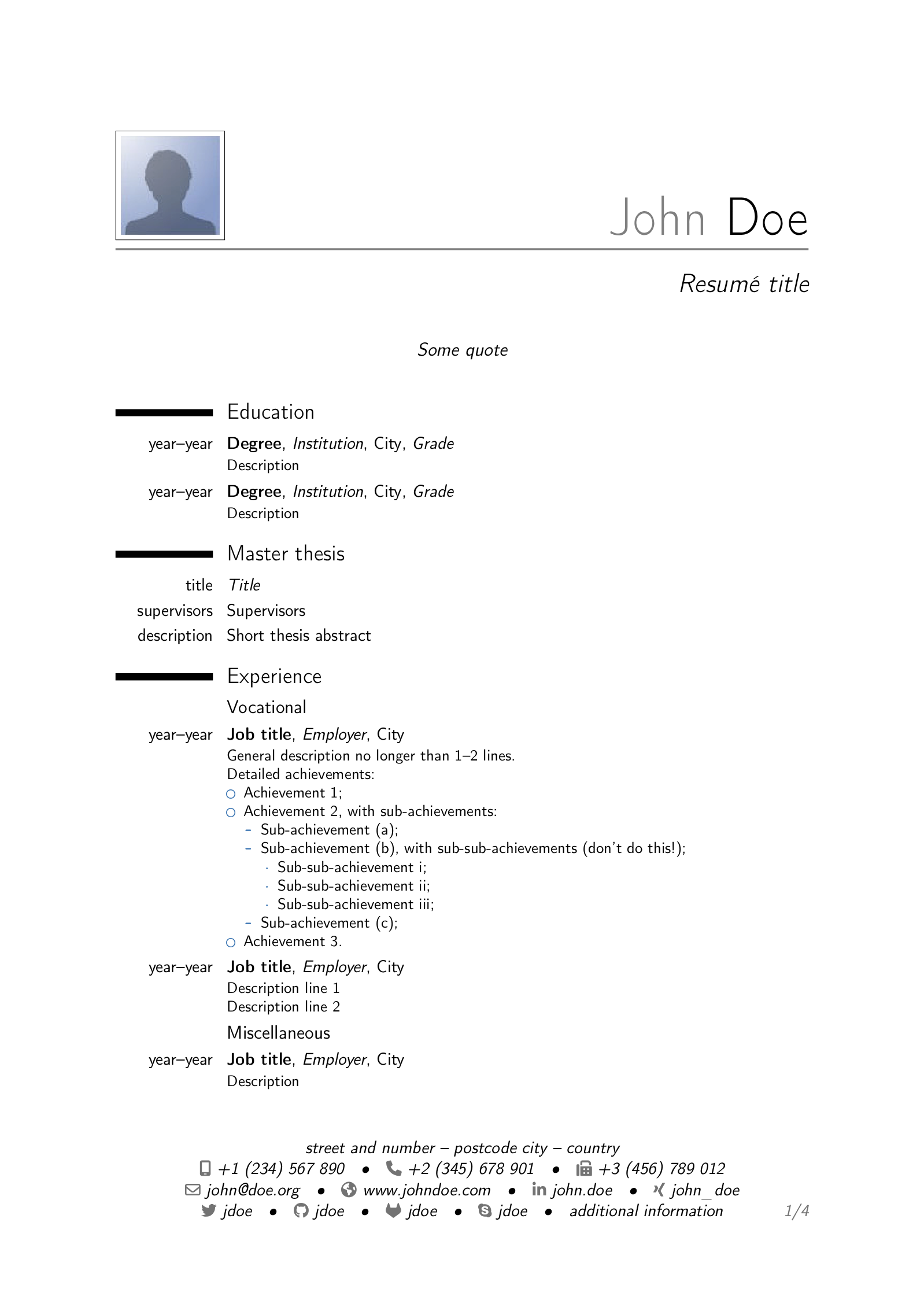
\name{John}{Doe}
\title{Resumé title}                               % optional, remove / comment the line if not wanted
\address{street and number}{postcode city}{country}% optional, remove / comment the line if not wanted; the "postcode city" and "country" arguments can be omitted or provided empty
\phone[mobile]{+1~(234)~567~890}                   % optional, remove / comment the line if not wanted; the optional "type" of the phone can be "mobile" (default), "fixed" or "fax"
\phone[fixed]{+2~(345)~678~901}
\phone[fax]{+3~(456)~789~012}
\email{[email protected]}                               % optional, remove / comment the line if not wanted
\homepage{www.johndoe.com}                         % optional, remove / comment the line if not wanted
\social[linkedin]{john.doe}                        % optional, remove / comment the line if not wanted
\social[xing]{john\_doe}                           % optional, remove / comment the line if not wanted
\social[twitter]{jdoe}                             % optional, remove / comment the line if not wanted
\social[github]{jdoe}                              % optional, remove / comment the line if not wanted
\social[gitlab]{jdoe}                              % optional, remove / comment the line if not wanted
\social[skype]{jdoe}                               % optional, remove / comment the line if not wanted
\extrainfo{additional information}                 % optional, remove / comment the line if not wanted
\photo[64pt][0.4pt]{picture}                       % optional, remove / comment the line if not wanted; '64pt' is the height the picture must be resized to, 0.4pt is the thickness of the frame around it (put it to 0pt for no frame) and 'picture' is the name of the picture file
\quote{Some quote}                                 % optional, remove / comment the line if not wanted

% bibliography adjustements (only useful if you make citations in your resume, or print a list of publications using BibTeX)
%   to show numerical labels in the bibliography (default is to show no labels)
%\makeatletter\renewcommand*{\bibliographyitemlabel}{\@biblabel{\arabic{enumiv}}}\makeatother
\renewcommand*{\bibliographyitemlabel}{[\arabic{enumiv}]}
%   to redefine the bibliography heading string ("Publications")
%\renewcommand{\refname}{Articles}

% bibliography with mutiple entries
%\usepackage{multibib}
%\newcites{book,misc}{{Books},{Others}}
%----------------------------------------------------------------------------------
%            content
%----------------------------------------------------------------------------------
\begin{document}
%\begin{CJK*}{UTF8}{gbsn}                          % to typeset your resume in Chinese using CJK
%-----       resume       ---------------------------------------------------------
\makecvtitle

\section{Education}
\cventry{year--year}{Degree}{Institution}{City}{\textit{Grade}}{Description}  % arguments 3 to 6 can be left empty
\cventry{year--year}{Degree}{Institution}{City}{\textit{Grade}}{Description}

\section{Master thesis}
\cvitem{title}{\emph{Title}}
\cvitem{supervisors}{Supervisors}
\cvitem{description}{Short thesis abstract}

\section{Experience}
\subsection{Vocational}
\cventry{year--year}{Job title}{Employer}{City}{}{General description no longer than 1--2 lines.\newline{}%
Detailed achievements:%
\begin{itemize}%
\item Achievement 1;
\item Achievement 2, with sub-achievements:
  \begin{itemize}%
  \item Sub-achievement (a);
  \item Sub-achievement (b), with sub-sub-achievements (don't do this!);
    \begin{itemize}
    \item Sub-sub-achievement i;
    \item Sub-sub-achievement ii;
    \item Sub-sub-achievement iii;
    \end{itemize}
  \item Sub-achievement (c);
  \end{itemize}
\item Achievement 3.
\end{itemize}}
\cventry{year--year}{Job title}{Employer}{City}{}{Description line 1\newline{}Description line 2}
\subsection{Miscellaneous}
\cventry{year--year}{Job title}{Employer}{City}{}{Description}

\section{Languages}
\cvitemwithcomment{Language 1}{Skill level}{Comment}
\cvitemwithcomment{Language 2}{Skill level}{Comment}
\cvitemwithcomment{Language 3}{Skill level}{Comment}

\section{Computer skills}
\cvdoubleitem{category 1}{XXX, YYY, ZZZ}{category 4}{XXX, YYY, ZZZ}
\cvdoubleitem{category 2}{XXX, YYY, ZZZ}{category 5}{XXX, YYY, ZZZ}
\cvdoubleitem{category 3}{XXX, YYY, ZZZ}{category 6}{XXX, YYY, ZZZ}

\section{Interests}
\cvitem{hobby 1}{Description}
\cvitem{hobby 2}{Description}
\cvitem{hobby 3}{Description}

\section{Extra 1}
\cvlistitem{Item 1}
\cvlistitem{Item 2}
\cvlistitem{Item 3. This item is particularly long and therefore normally spans over several lines. Did you notice the indentation when the line wraps?}

\section{Extra 2}
\cvlistdoubleitem{Item 1}{Item 4}
\cvlistdoubleitem{Item 2}{Item 5\cite{book1}}
\cvlistdoubleitem{Item 3}{Item 6. Like item 3 in the single column list before, this item is particularly long to wrap over several lines.}

\section{References}
\begin{cvcolumns}
  \cvcolumn{Category 1}{\begin{itemize}\item Person 1\item Person 2\item Person 3\end{itemize}}
  \cvcolumn{Category 2}{Amongst others:\begin{itemize}\item Person 1, and\item Person 2\end{itemize}(more upon request)}
  \cvcolumn[0.5]{All the rest \& some more}{\textit{That} person, and \textbf{those} also (all available upon request).}
\end{cvcolumns}

% Publications from a BibTeX file without multibib
%  for numerical labels: \renewcommand{\bibliographyitemlabel}{\@biblabel{\arabic{enumiv}}}% CONSIDER MERGING WITH PREAMBLE PART
%  to redefine the heading string ("Publications"): \renewcommand{\refname}{Articles}
\nocite{*}
\bibliographystyle{plain}
\bibliography{publications}                        % 'publications' is the name of a BibTeX file

% Publications from a BibTeX file using the multibib package
%\section{Publications}
%\nocitebook{book1,book2}
%\bibliographystylebook{plain}
%\bibliographybook{publications}                   % 'publications' is the name of a BibTeX file
%\nocitemisc{misc1,misc2,misc3}
%\bibliographystylemisc{plain}
%\bibliographymisc{publications}                   % 'publications' is the name of a BibTeX file

\clearpage
%-----       letter       ---------------------------------------------------------
% recipient data
\recipient{Company Recruitment team}{Company, Inc.\\123 somestreet\\some city}
\date{January 01, 1984}
\opening{Dear Sir or Madam,}
\closing{Yours faithfully,}
\enclosure[Attached]{curriculum vit\ae{}}          % use an optional argument to use a string other than "Enclosure", or redefine \enclname
\makelettertitle

Lorem ipsum dolor sit amet, consectetur adipiscing elit. Duis ullamcorper neque sit amet lectus facilisis sed luctus nisl iaculis. Vivamus at neque arcu, sed tempor quam. Curabitur pharetra tincidunt tincidunt. Morbi volutpat feugiat mauris, quis tempor neque vehicula volutpat. Duis tristique justo vel massa fermentum accumsan. Mauris ante elit, feugiat vestibulum tempor eget, eleifend ac ipsum. Donec scelerisque lobortis ipsum eu vestibulum. Pellentesque vel massa at felis accumsan rhoncus.

Suspendisse commodo, massa eu congue tincidunt, elit mauris pellentesque orci, cursus tempor odio nisl euismod augue. Aliquam adipiscing nibh ut odio sodales et pulvinar tortor laoreet. Mauris a accumsan ligula. Class aptent taciti sociosqu ad litora torquent per conubia nostra, per inceptos himenaeos. Suspendisse vulputate sem vehicula ipsum varius nec tempus dui dapibus. Phasellus et est urna, ut auctor erat. Sed tincidunt odio id odio aliquam mattis. Donec sapien nulla, feugiat eget adipiscing sit amet, lacinia ut dolor. Phasellus tincidunt, leo a fringilla consectetur, felis diam aliquam urna, vitae aliquet lectus orci nec velit. Vivamus dapibus varius blandit.

Duis sit amet magna ante, at sodales diam. Aenean consectetur porta risus et sagittis. Ut interdum, enim varius pellentesque tincidunt, magna libero sodales tortor, ut fermentum nunc metus a ante. Vivamus odio leo, tincidunt eu luctus ut, sollicitudin sit amet metus. Nunc sed orci lectus. Ut sodales magna sed velit volutpat sit amet pulvinar diam venenatis.

Albert Einstein discovered that $e=mc^2$ in 1905.

\[ e=\lim_{n \to \infty} \left(1+\frac{1}{n}\right)^n \]

\makeletterclosing

%\clearpage\end{CJK*}                              % if you are typesetting your resume in Chinese using CJK; the \clearpage is required for fancyhdr to work correctly with CJK, though it kills the page numbering by making \lastpage undefined
\end{document}


%% end of file `template.tex'.
publications.bib
%% start of file `publications.bib'.
%% Copyright 2006-2012 Xavier Danaux (xdanaux at gmail.com).
%
% This work may be distributed and/or modified under the
% conditions of the LaTeX Project Public License version 1.3c,
% available at http://www.latex-project.org/lppl/.


@BOOK{book1,
  author = {John Doe and Author 1},
  title = {Title},
  publisher = {Publisher},
  edition = {edition},
  year = {year},
}

@BOOK{book2,
  author = {John Doe and Author 2},
  title = {Title},
  publisher = {Publisher},
  edition = {edition},
  year = {year},
}

@MISC{misc1,
  author = {John Doe},
  title = {Title},
  year = {year},
}

@MISC{misc2,
  author = {John Doe and Author 3},
  title = {Title},
  year = {year},
}

@MISC{misc3,
  author = {John Doe},
  title = {Title},
  year = {year},
}


%% end of file `publications.bib'.
picture.jpg

How to use this template
Everything runs in your browser: nothing to install, no login, no compile timeout.
- Click Open in LaTeX.to. The template opens as a project in the Projects pane, with template.tex in the editor and its finished PDF in the preview.
- Click Preview, or press Ctrl+Enter (Cmd+Enter on a Mac), to compile. The preview shows the new PDF; you do not need to save first.
- If the compile fails, the Console pane opens with the LaTeX log. The first error in it says what went wrong and on which line.
- To add an image, a .bib file or another .tex file, open the project's menu (the three dots next to its name in the Projects pane) and choose Upload file or New file.
- The arrow next to Preview has Download PDF. Ctrl+S saves your edits, and the project stays in your browser on this device.
How to change the color
Two lines under the \documentclass line decide the whole look.
\moderncvcolor{blue}is the color, and the other names areblack,burgundy,green,grey,orange,purpleandred.\moderncvstyle{casual}is the layout, and the other names areclassic,banking,oldstyleandfancy.- The two are independent, so
bankingwithgreenis a valid pair. - The class that compiles here is newer than this example and adds a
contemporarylayout and aceruleancolor. Forcontemporary, move the\moderncvcolorline above the\moderncvstyleline, or the compile stops atUndefined color. sansin the\documentclass[11pt,a4paper,sans]{moderncv}line is the font family, andromanthere gives you a serif CV.
How to add your photo
The example already prints a photo, and picture.jpg beside template.tex is the file it uses.
- Replace
picture.jpgwith your own picture under the same name, or changepicturein the\photoline to your file name. - The
64ptin\photo[64pt][0.4pt]{picture}is the height the picture is scaled to. - The
0.4ptis the frame drawn around it, so set it to0ptfor no frame. - Comment out the whole
\photoline for a CV with no picture at all.
More templates: Awesome CV, billryan resume, sb2nov resume, Deedy Resume, latexcv, Jake's Resume, McDowell CV, AltaCV and all templates.