latexcv LaTeX CV template
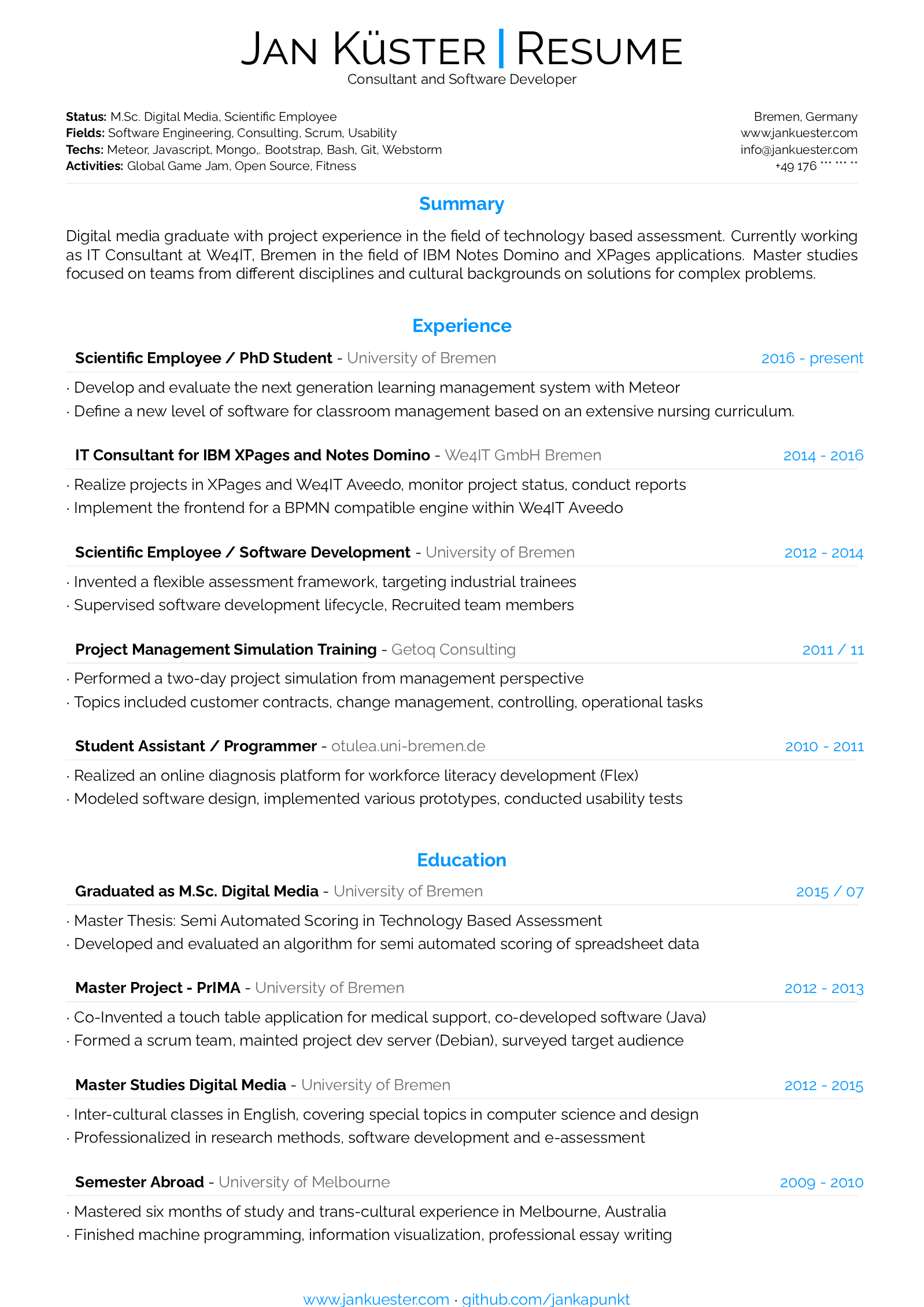
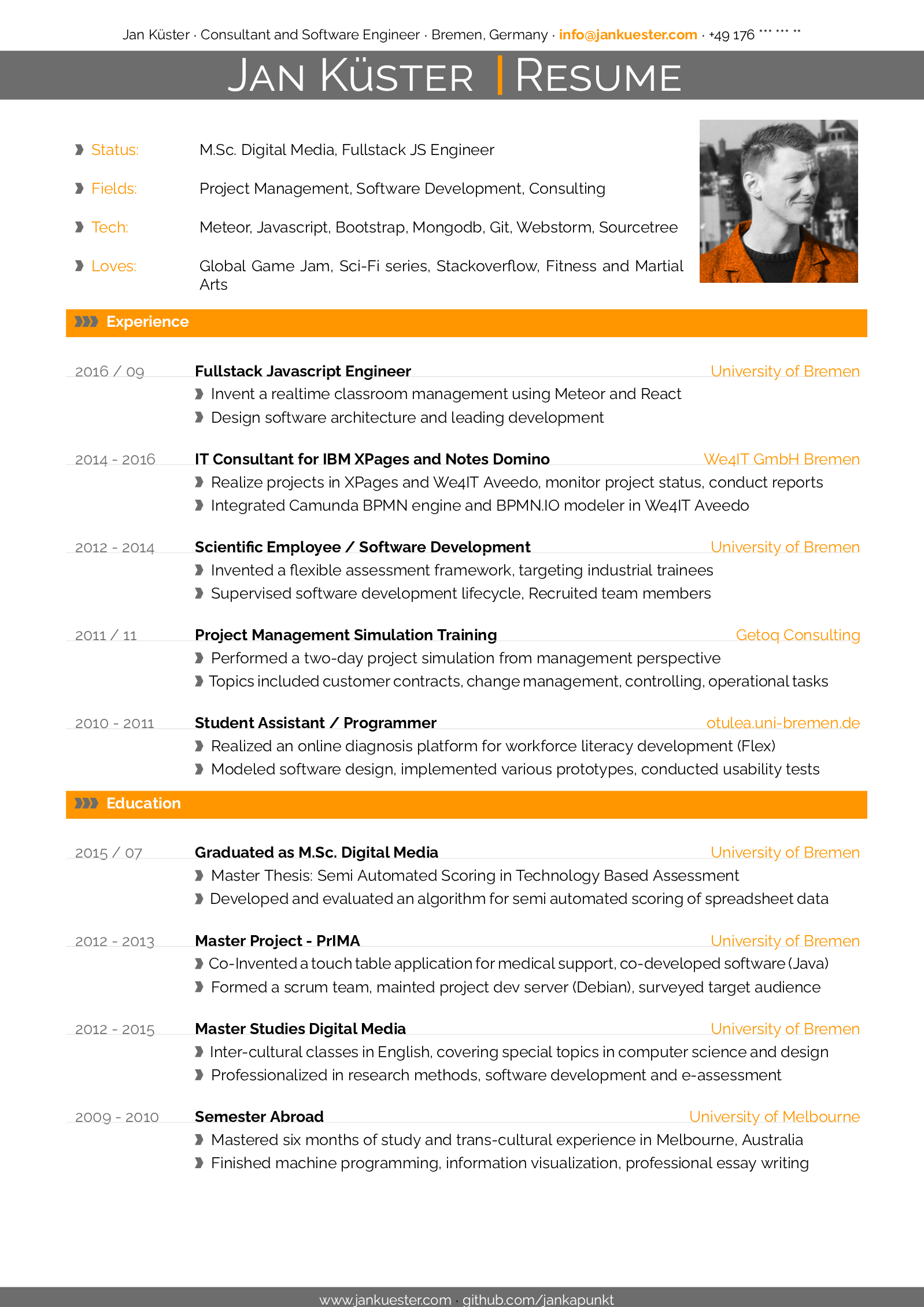
The latexcv LaTeX CV template is Jan Küster's collection of self designed CV layouts built on the plain article class, compiled with pdfLaTeX, in its Classic and its Modern layout.
- Engine: pdfLaTeX
- Source: jankapunkt/latexcv 3.3k 1fc7a20 19 Sep 2026
- License: MIT
Classic
Open in LaTeX.to Download all files (zip)
Files:
main.tex
%-----------------------------------------------------------------------------------------------------------------------------------------------%
%	The MIT License (MIT)
%
%	Copyright (c) 2015 Jan Küster
%
%	Permission is hereby granted, free of charge, to any person obtaining a copy
%	of this software and associated documentation files (the "Software"), to deal
%	in the Software without restriction, including without limitation the rights
%	to use, copy, modify, merge, publish, distribute, sublicense, and/or sell
%	copies of the Software, and to permit persons to whom the Software is
%	furnished to do so, subject to the following conditions:
%
%	THE SOFTWARE IS PROVIDED "AS IS", WITHOUT WARRANTY OF ANY KIND, EXPRESS OR
%	IMPLIED, INCLUDING BUT NOT LIMITED TO THE WARRANTIES OF MERCHANTABILITY,
%	FITNESS FOR A PARTICULAR PURPOSE AND NONINFRINGEMENT. IN NO EVENT SHALL THE
%	AUTHORS OR COPYRIGHT HOLDERS BE LIABLE FOR ANY CLAIM, DAMAGES OR OTHER
%	LIABILITY, WHETHER IN AN ACTION OF CONTRACT, TORT OR OTHERWISE, ARISING FROM,
%	OUT OF OR IN CONNECTION WITH THE SOFTWARE OR THE USE OR OTHER DEALINGS IN
%	THE SOFTWARE.
%
%
%-----------------------------------------------------------------------------------------------------------------------------------------------%


%============================================================================%
%
%	DOCUMENT DEFINITION
%
%============================================================================%

%we use article class because we want to fully customize the page and don't use a cv template
\documentclass[10pt,A4]{article}


%----------------------------------------------------------------------------------------
%	ENCODING
%----------------------------------------------------------------------------------------

%we use utf8 since we want to build from any machine
\usepackage[utf8]{inputenc}

%----------------------------------------------------------------------------------------
%	LOGIC
%----------------------------------------------------------------------------------------

% provides \isempty test
\usepackage{xifthen}

%----------------------------------------------------------------------------------------
%	FONT
%----------------------------------------------------------------------------------------

% some tex-live fonts - choose your own

%\usepackage[defaultsans]{droidsans}
%\usepackage[default]{comfortaa}
%\usepackage{cmbright}
\usepackage[default]{raleway}
%\usepackage{fetamont}
%\usepackage[default]{gillius}
%\usepackage[light,math]{iwona}
%\usepackage[thin]{roboto}

% set font default
\renewcommand*\familydefault{\sfdefault}
\usepackage[T1]{fontenc}

% more font size definitions
\usepackage{moresize}


%----------------------------------------------------------------------------------------
%	PAGE LAYOUT  DEFINITIONS
%----------------------------------------------------------------------------------------

%debug page outer frames
%\usepackage{showframe}


%define page styles using geometry
\usepackage[a4paper]{geometry}

% for example, change the margins to 2 inches all round
\geometry{top=1.25cm, bottom=-.6cm, left=1.5cm, right=1.5cm}

%use customized header
\usepackage{fancyhdr}
\pagestyle{fancy}

%less space between header and content
\setlength{\headheight}{-5pt}


%customize entries left, center and right
%\lhead{}
%\chead{}
%\rhead{}


%indentation is zero
\setlength{\parindent}{0mm}

%----------------------------------------------------------------------------------------
%	TABLE /ARRAY DEFINITIONS
%----------------------------------------------------------------------------------------

%for layouting tables
\usepackage{multicol}
\usepackage{multirow}

%extended aligning of tabular cells
\usepackage{array}

\newcolumntype{x}[1]{%
>{\raggedleft\hspace{0pt}}p{#1}}%


%----------------------------------------------------------------------------------------
%	GRAPHICS DEFINITIONS
%----------------------------------------------------------------------------------------

%for header image
\usepackage{graphicx}

%for floating figures
\usepackage{wrapfig}
\usepackage{float}
%\floatstyle{boxed}
%\restylefloat{figure}

%for drawing graphics
\usepackage{tikz}
\usetikzlibrary{shapes, backgrounds,mindmap, trees}


%----------------------------------------------------------------------------------------
%	Color DEFINITIONS
%----------------------------------------------------------------------------------------

\usepackage{color}

%accent color
\definecolor{sectcol}{RGB}{0,150,255}

%dark background color
\definecolor{bgcol}{RGB}{110,110,110}

%light background / accent color
\definecolor{softcol}{RGB}{225,225,225}


%============================================================================%
%
%
%	DEFINITIONS
%
%
%============================================================================%

%----------------------------------------------------------------------------------------
% 	HEADER
%----------------------------------------------------------------------------------------

% remove top header line
\renewcommand{\headrulewidth}{0pt}

%remove bottom header line
\renewcommand{\footrulewidth}{0pt}

%remove pagenum
\renewcommand{\thepage}{}

%remove section num
\renewcommand{\thesection}{}

%----------------------------------------------------------------------------------------
% 	ARROW GRAPHICS in Tikz
%----------------------------------------------------------------------------------------

% a six pointed arrow pointing to the left
\newcommand{\tzlarrow}{(0,0) -- (0.2,0) -- (0.3,0.2) -- (0.2,0.4) -- (0,0.4) -- (0.1,0.2) -- cycle;}

% include the left arrow into a tikz picture
% param1: fill color
%
\newcommand{\larrow}[1]
{\begin{tikzpicture}[scale=0.58]
	 \filldraw[fill=#1!100,draw=#1!100!black]  \tzlarrow
 \end{tikzpicture}
}

% a six pointed arrow pointing to the right
\newcommand{\tzrarrow}{ (0,0.2) -- (0.1,0) -- (0.3,0) -- (0.2,0.2) -- (0.3,0.4) -- (0.1,0.4) -- cycle;}

% include the right arrow into a tikz picture
% param1: fill color
%
\newcommand{\rarrow}
{\begin{tikzpicture}[scale=0.7]
	\filldraw[fill=sectcol!100,draw=sectcol!100!black] \tzrarrow
 \end{tikzpicture}
}


%----------------------------------------------------------------------------------------
%	custom sections
%----------------------------------------------------------------------------------------

% create a coloured box with arrow and title as cv section headline
% param 1: section title
%
\newcommand{\cvsection}[1]
{
	\begin{center}
		\large\textcolor{sectcol}{\textbf{#1}}
	\end{center}
}

%create a coloured arrow with title as cv meta section section
% param 1: meta section title
%
\newcommand{\metasection}[2]
{
%\begin{tabular*}{1\textwidth}{r r}
\footnotesize{#2} \hspace*{\fill} \footnotesize{#1}\\[1pt]
%\end{tabular*}
}

%----------------------------------------------------------------------------------------
%	 CV EVENT
%----------------------------------------------------------------------------------------

% creates a stretched box as cv entry headline followed by some paragraphs about
% the work you did
% param 1:	event time i.e. 2014 or 2011-2014 etc.
% param 2:	event name (what did you do?)
% param 3:	institution (where did you work / study)
% param 4:	list of paragraphs
%
\newcommand{\cvevent}[4]
{

\begin{tabular*}{1\textwidth}{p{13.6cm}  x{3.9cm}}
	\textbf{#2} - \textcolor{bgcol}{#3} &   \vspace{2.5pt}\textcolor{sectcol}{#1}
\end{tabular*}

\vspace{-8pt}
\textcolor{softcol}{\hrule}
\vspace{6pt}

	\foreach \desc in {#4}{
		$\cdot$ \desc\\[3pt]
	}

\vspace{3pt}
}

% creates a stretched box as
\newcommand{\cveventmeta}[2]
{
	\mbox{\mystrut \hspace{87pt}\textit{#1}}\\
	#2
}

%----------------------------------------------------------------------------------------
% CUSTOM STRUT FOR EMPTY BOXES
%----------------------------------------- -----------------------------------------------
\newcommand{\mystrut}{\rule[-.3\baselineskip]{0pt}{\baselineskip}}

%----------------------------------------------------------------------------------------
% CUSTOM LOREM IPSUM
%----------------------------------------------------------------------------------------
\newcommand{\lorem}
{Lorem ipsum dolor sit amet, consectetur adipiscing elit. Donec a diam lectus.}


%============================================================================%
%
%
%
%	DOCUMENT CONTENT
%
%
%
%============================================================================%
\begin{document}


%use our custom fancy header definitions
\pagestyle{fancy}


%----------------------------------------------------------------------------------------
%	HEADER IMAGE
%----------------------------------------------------------------------------------------

%\begin{figure}[H]
%\begin{flushright}
%	\includegraphics[trim= 320 130 460 210,clip,width=0.2\linewidth]{myfoto.jpg}	%trimming relative to image size!
%\end{flushright}
%\end{figure}


%---------------------------------------------------------------------------------------
%	TITLE HEADLINE
%----------------------------------------------------------------------------------------
\vspace{-8pt}
\begin{center}
	\HUGE \textsc{Jan Küster} \textcolor{sectcol}{\rule[-1mm]{1mm}{0.9cm}} \textsc{Resume}\\[2pt]
	\small Consultant and Software Developer
\end{center}


\vspace{6pt}


%---------------------------------------------------------------------------------------
%	META SECTION
%----------------------------------------------------------------------------------------
\metasection{Bremen, Germany}{\textbf{Status:} M.Sc. Digital Media, Scientific Employee}
\metasection{www.jankuester.com}{\textbf{Fields:} Software Engineering, Consulting, Scrum, Usability}
\metasection{[email protected]}{\textbf{Techs:} Meteor, Javascript, Mongo,. Bootstrap, Bash, Git, Webstorm}
\metasection{+49 176 *** *** **}{\textbf{Activities:} Global Game Jam, Open Source, Fitness}
\vspace{-2pt}
\textcolor{softcol}{\hrule}
\vspace{6pt}

\normalsize

%---------------------------------------------------------------------------------------
%	SUMMARAY (optional)
%----------------------------------------------------------------------------------------
\vspace{-6pt}
\cvsection{Summary}
Digital media graduate with project experience in the field of technology based assessment. Currently working as IT Consultant at We4IT, Bremen in the field of IBM Notes Domino and XPages applications. Master studies focused on teams from different disciplines and cultural backgrounds on solutions for complex problems.\\


%============================================================================%
%
%	CV SECTIONS AND EVENTS (MAIN CONTENT)
%
%============================================================================%

%---------------------------------------------------------------------------------------
%	EXPERIENCE
%----------------------------------------------------------------------------------------
\cvsection{Experience}

\cvevent{2016 - present}{Scientific Employee / PhD Student}{University of Bremen}{
	{Develop and evaluate the next generation learning management system with Meteor},
	{Define a new level of software for classroom management based on an extensive nursing curriculum.}
}

%
\cvevent{2014 - 2016}{IT Consultant for IBM XPages and Notes Domino}{We4IT GmbH Bremen}{
	{Realize projects in XPages and We4IT Aveedo, monitor project status, conduct reports},
	{Implement the frontend for a BPMN compatible engine within We4IT Aveedo}
}

%\textcolor{softcol}{\hrule}

%
\cvevent{2012 - 2014}{Scientific Employee / Software Development}{University of Bremen}{
	{Invented a flexible assessment framework, targeting industrial trainees},
	{Supervised software development lifecycle, Recruited team members}
}

%\textcolor{softcol}{\hrule}

%
\cvevent{2011 / 11}{Project Management Simulation Training}{Getoq Consulting}{
	{Performed a two-day project simulation from management perspective},
	{Topics included customer contracts, change management, controlling, operational tasks}
}

%\textcolor{softcol}{\hrule}


%
\cvevent{2010 - 2011}{Student Assistant / Programmer}{otulea.uni-bremen.de}{
	{Realized an online diagnosis platform for workforce literacy development (Flex)},
	{Modeled software design, implemented various prototypes, conducted usability tests}
}


%---------------------------------------------------------------------------------------
%	EDUCATION SECTION
%--------------------------------------------------------------------------------------
\cvsection{Education}

\cvevent{2015 / 07}{Graduated as M.Sc. Digital Media}{University of Bremen}{
	{Master Thesis: Semi Automated Scoring in Technology Based Assessment},
	{Developed and evaluated an algorithm for semi automated scoring of spreadsheet data}
}

%\textcolor{softcol}{\hrule}

%
\cvevent{2012 - 2013}{Master Project - PrIMA}{University of Bremen}{
	{Co-Invented a touch table application for medical support, co-developed software (Java)},
	{Formed a scrum team, mainted project dev server (Debian), surveyed target audience}
}

%\textcolor{softcol}{\hrule}

%
\cvevent{2012 - 2015}{Master Studies Digital Media}{University of Bremen}{
	{Inter-cultural classes in English, covering special topics in computer science and design},
	{Professionalized in research methods, software development and e-assessment}
}

%\textcolor{softcol}{\hrule}

%
\cvevent{2009 - 2010}{Semester Abroad}{University of Melbourne}{
	{Mastered six months of study and trans-cultural experience in Melbourne, Australia},
	{Finished machine programming, information visualization, professional essay writing}
}


%--------------------------------------------------------------------------------------------------
%	ARTIFICIAL FOOTER (fancy footer cannot exceed linewidth)
%--------------------------------------------------------------------------------------------------

\null
\vspace*{\fill}
\hspace{-0.25\linewidth}\colorbox{white}{\makebox[1.5\linewidth][c]{\mystrut  \textnormal{\textcolor{sectcol}{www.jankuester.com} $\cdot$ \textcolor{sectcol}{github.com/jankapunkt}}}}


%============================================================================%
%
%
%
%	DOCUMENT END
%
%
%
%============================================================================%
\end{document}
LICENSE
MIT License

Copyright (c) 2017 Jan Küster

Permission is hereby granted, free of charge, to any person obtaining a copy
of this software and associated documentation files (the "Software"), to deal
in the Software without restriction, including without limitation the rights
to use, copy, modify, merge, publish, distribute, sublicense, and/or sell
copies of the Software, and to permit persons to whom the Software is
furnished to do so, subject to the following conditions:

The above copyright notice and this permission notice shall be included in all
copies or substantial portions of the Software.

THE SOFTWARE IS PROVIDED "AS IS", WITHOUT WARRANTY OF ANY KIND, EXPRESS OR
IMPLIED, INCLUDING BUT NOT LIMITED TO THE WARRANTIES OF MERCHANTABILITY,
FITNESS FOR A PARTICULAR PURPOSE AND NONINFRINGEMENT. IN NO EVENT SHALL THE
AUTHORS OR COPYRIGHT HOLDERS BE LIABLE FOR ANY CLAIM, DAMAGES OR OTHER
LIABILITY, WHETHER IN AN ACTION OF CONTRACT, TORT OR OTHERWISE, ARISING FROM,
OUT OF OR IN CONNECTION WITH THE SOFTWARE OR THE USE OR OTHER DEALINGS IN THE
SOFTWARE.
Modern
Open in LaTeX.to Download all files (zip)
Files:
main.tex
%-----------------------------------------------------------------------------------------------------------------------------------------------%
% The MIT License (MIT)
%
% Copyright (c) 2015 Jan Küster
%
% Permission is hereby granted, free of charge, to any person obtaining a copy
% of this software and associated documentation files (the "Software"), to deal
% in the Software without restriction, including without limitation the rights
% to use, copy, modify, merge, publish, distribute, sublicense, and/or sell
% copies of the Software, and to permit persons to whom the Software is
% furnished to do so, subject to the following conditions:
%
% THE SOFTWARE IS PROVIDED "AS IS", WITHOUT WARRANTY OF ANY KIND, EXPRESS OR
% IMPLIED, INCLUDING BUT NOT LIMITED TO THE WARRANTIES OF MERCHANTABILITY,
% FITNESS FOR A PARTICULAR PURPOSE AND NONINFRINGEMENT. IN NO EVENT SHALL THE
% AUTHORS OR COPYRIGHT HOLDERS BE LIABLE FOR ANY CLAIM, DAMAGES OR OTHER
% LIABILITY, WHETHER IN AN ACTION OF CONTRACT, TORT OR OTHERWISE, ARISING FROM,
% OUT OF OR IN CONNECTION WITH THE SOFTWARE OR THE USE OR OTHER DEALINGS IN
% THE SOFTWARE.
%
%
%-----------------------------------------------------------------------------------------------------------------------------------------------%
%============================================================================%
%
% DOCUMENT DEFINITION
%
%============================================================================%
%we use article class because we want to fully customize the page and don't use a cv template
\documentclass[10pt,A4]{article}
%----------------------------------------------------------------------------------------
% ENCODING
%----------------------------------------------------------------------------------------
%we use utf8 since we want to build from any machine
\usepackage[utf8]{inputenc}
%----------------------------------------------------------------------------------------
% LOGIC
%----------------------------------------------------------------------------------------
% provides \isempty test
\usepackage{xifthen}
%----------------------------------------------------------------------------------------
% FONT
%----------------------------------------------------------------------------------------
% some tex-live fonts - choose your own
%\usepackage[defaultsans]{droidsans}
%\usepackage[default]{comfortaa}
%\usepackage{cmbright}
\usepackage[default]{raleway}
%\usepackage{fetamont}
%\usepackage[default]{gillius}
%\usepackage[light,math]{iwona}
%\usepackage[thin]{roboto}
% set font default
\renewcommand*\familydefault{\sfdefault}
\usepackage[T1]{fontenc}
% more font size definitions
\usepackage{moresize}
%----------------------------------------------------------------------------------------
% PAGE LAYOUT DEFINITIONS
%----------------------------------------------------------------------------------------
%debug page outer frames
%\usepackage{showframe}
%define page styles using geometry
\usepackage[a4paper]{geometry}
% for example, change the margins to 2 inches all round
\geometry{top=1.75cm, bottom=-.6cm, left=1.5cm, right=1.5cm}
%use customized header
\usepackage{fancyhdr}
\pagestyle{fancy}
%less space between header and content
\setlength{\headheight}{-5pt}
%customize entries left, center and right
\lhead{}
\chead{ \small{Jan Küster $\cdot$ Consultant and Software Engineer $\cdot$ Bremen, Germany $\cdot$ \textcolor{sectcol}{\textbf{[email protected]}} $\cdot$ +49 176 *** *** **}}
\rhead{}
%indentation is zero
\setlength{\parindent}{0mm}
%----------------------------------------------------------------------------------------
% TABLE /ARRAY DEFINITIONS
%----------------------------------------------------------------------------------------
%for layouting tables
\usepackage{multicol}
\usepackage{multirow}
%extended aligning of tabular cells
\usepackage{array}
\newcolumntype{x}[1]{%
>{\raggedleft\hspace{0pt}}p{#1}}%
%----------------------------------------------------------------------------------------
% GRAPHICS DEFINITIONS
%----------------------------------------------------------------------------------------
%for header image
\usepackage{graphicx}
%for floating figures
\usepackage{wrapfig}
\usepackage{float}
%\floatstyle{boxed}
%\restylefloat{figure}
%for drawing graphics
\usepackage{tikz}
\usetikzlibrary{shapes, backgrounds,mindmap, trees}
%----------------------------------------------------------------------------------------
% Color DEFINITIONS
%----------------------------------------------------------------------------------------
\usepackage{color}
%accent color
\definecolor{sectcol}{RGB}{255,150,0}
%dark background color
\definecolor{bgcol}{RGB}{110,110,110}
%light background / accent color
\definecolor{softcol}{RGB}{225,225,225}
%============================================================================%
%
%
% DEFINITIONS
%
%
%============================================================================%
%----------------------------------------------------------------------------------------
% HEADER
%----------------------------------------------------------------------------------------
% remove top header line
\renewcommand{\headrulewidth}{0pt}
%remove bottom header line
\renewcommand{\footrulewidth}{0pt}
%remove pagenum
\renewcommand{\thepage}{}
%remove section num
\renewcommand{\thesection}{}
%----------------------------------------------------------------------------------------
% ARROW GRAPHICS in Tikz
%----------------------------------------------------------------------------------------
% a six pointed arrow pointing to the left
\newcommand{\tzlarrow}{(0,0) -- (0.2,0) -- (0.3,0.2) -- (0.2,0.4) -- (0,0.4) -- (0.1,0.2) -- cycle;}
% include the left arrow into a tikz picture
% param1: fill color
%
\newcommand{\larrow}[1]
{\begin{tikzpicture}[scale=0.58]
\filldraw[fill=#1!100,draw=#1!100!black] \tzlarrow
\end{tikzpicture}
}
% a six pointed arrow pointing to the right
\newcommand{\tzrarrow}{ (0,0.2) -- (0.1,0) -- (0.3,0) -- (0.2,0.2) -- (0.3,0.4) -- (0.1,0.4) -- cycle;}
% include the right arrow into a tikz picture
% param1: fill color
%
\newcommand{\rarrow}
{\begin{tikzpicture}[scale=0.7]
\filldraw[fill=sectcol!100,draw=sectcol!100!black] \tzrarrow
\end{tikzpicture}
}
%----------------------------------------------------------------------------------------
% custom sections
%----------------------------------------------------------------------------------------
% create a coloured box with arrow and title as cv section headline
% param 1: section title
%
\newcommand{\cvsection}[1]
{
\colorbox{sectcol}{\mystrut \makebox[1\linewidth][l]{
\larrow{bgcol} \hspace{-8pt} \larrow{bgcol} \hspace{-8pt} \larrow{bgcol} \textcolor{white}{\textbf{#1}}\hspace{4pt}
}}\\
}
%create a coloured arrow with title as cv meta section section
% param 1: meta section title
%
\newcommand{\metasection}[2]
{
\begin{tabular*}{1\textwidth}{p{2.4cm} p{11cm}}
\larrow{bgcol} \normalsize{\textcolor{sectcol}{#1}}\\[12pt]
\end{tabular*}
}
%----------------------------------------------------------------------------------------
% CV EVENT
%----------------------------------------------------------------------------------------
% creates a stretched box as cv entry headline followed by two paragraphs about
% the work you did
% param 1: event time i.e. 2014 or 2011-2014 etc.
% param 2: event name (what did you do?)
% param 3: institution (where did you work / study)
% param 4: what was your position
% param 5: some words about your contributions
%
\newcommand{\cvevent}[5]
{
\vspace{8pt}
\begin{tabular*}{1\textwidth}{p{2.3cm} p{10.8cm} x{3.9cm}}
\textcolor{bgcol}{#1}& \textbf{#2} & \vspace{2.5pt}\textcolor{sectcol}{#3}
\end{tabular*}
\vspace{-12pt}
\textcolor{softcol}{\hrule}
\vspace{6pt}
\begin{tabular*}{1\textwidth}{p{2.3cm} p{14.4cm}}
& \larrow{bgcol} #4\\[3pt]
& \larrow{bgcol} #5\\[6pt]
\end{tabular*}
}
% creates a stretched box as
\newcommand{\cveventmeta}[2]
{
\mbox{\mystrut \hspace{87pt}\textit{#1}}\\
#2
}
%----------------------------------------------------------------------------------------
% CUSTOM STRUT FOR EMPTY BOXES
%----------------------------------------- -----------------------------------------------
\newcommand{\mystrut}{\rule[-.3\baselineskip]{0pt}{\baselineskip}}
%----------------------------------------------------------------------------------------
% CUSTOM LOREM IPSUM
%----------------------------------------------------------------------------------------
\newcommand{\lorem}
{Lorem ipsum dolor sit amet, consectetur adipiscing elit. Donec a diam lectus.}
%============================================================================%
%
%
%
% DOCUMENT CONTENT
%
%
%
%============================================================================%
\begin{document}
%use our custom fancy header definitions
\pagestyle{fancy}
%---------------------------------------------------------------------------------------
% TITLE HEADLINE
%----------------------------------------------------------------------------------------
\vspace{-20.55pt}
% use this for multiple words like working titles etc.
%\hspace{-0.25\linewidth}\colorbox{bgcol}{\makebox[1.5\linewidth][c]{\hspace{46pt}\HUGE{\textcolor{white}{\textsc{Jan Küster}} } \textcolor{sectcol}{\rule[-1mm]{1mm}{0.9cm}} \parbox[b]{5cm}{ \large{ \textcolor{white}{{IT Consultant}}}\\
% \large{ \textcolor{white}{{Resume}}}}
%}}
% use this for single words, e.g. CV or RESUME etc.
\hspace{-0.25\linewidth}\colorbox{bgcol}{\makebox[1.5\linewidth][c]{\HUGE{\textcolor{white}{\textsc{Jan Küster}} } \textcolor{sectcol}{\rule[-1mm]{1mm}{0.9cm}} \HUGE{\textcolor{white}{\textsc{Resume}} } }}
%----------------------------------------------------------------------------------------
% HEADER IMAGE
%----------------------------------------------------------------------------------------
\begin{figure}[H]
\begin{flushright}
\includegraphics[trim= 320 130 460 210,clip,width=0.2\linewidth]{myfoto.jpg} %trimming relative to image size!
\end{flushright}
\end{figure}
%---------------------------------------------------------------------------------------
% QR CODE (optional)
%----------------------------------------------------------------------------------------
%\vspace{-136pt}
%\hspace{0.75\linewidth}
%\includegraphics[width=103pt]{qrcode}
%\normalsize
%\vspace{88pt}
%---------------------------------------------------------------------------------------
% META SECTION
%----------------------------------------------------------------------------------------
\vspace{-114pt}
\metasection{Status:}{M.Sc. Digital Media, Fullstack JS Engineer}
\metasection{Fields:}{Project Management, Software Development, Consulting}
\metasection{Tech:}{Meteor, Javascript, Bootstrap, Mongodb, Git, Webstorm, Sourcetree}
\metasection{Loves:}{Global Game Jam, Sci-Fi series, Stackoverflow, Fitness and Martial Arts}
\vspace{6pt}
%---------------------------------------------------------------------------------------
% SUMMARAY (optional)
%----------------------------------------------------------------------------------------
%\cvsection{Summary}\\
%I am a digital media graduate (M.Sc.) with project experience in educational research as well as in the private sector. During my studies I focused on e-assessment software and moved over to b2b software for IBM Notes Domino.
%Currently I develop and evaluate the next generation learning management system with Meteor based on an extensive nursing curriculum for healthcare education. I also love fitness, martial arts, videogames, news and Sci-Fi series.\\[-2pt]
%============================================================================%
%
% CV SECTIONS AND EVENTS (MAIN CONTENT)
%
%============================================================================%
%---------------------------------------------------------------------------------------
% EXPERIENCE
%----------------------------------------------------------------------------------------
\cvsection{Experience}
%
\cvevent{2016 / 09}{Fullstack Javascript Engineer}{University of Bremen}{Invent a realtime classroom management using Meteor and React}{Design software architecture and leading development}
%\textcolor{softcol}{\hrule}
%
\cvevent{2014 - 2016}{IT Consultant for IBM XPages and Notes Domino}{We4IT GmbH Bremen}{Realize projects in XPages and We4IT Aveedo, monitor project status, conduct reports}{Integrated Camunda BPMN engine and BPMN.IO modeler in We4IT Aveedo}
%\textcolor{softcol}{\hrule}
%
\cvevent{2012 - 2014}{Scientific Employee / Software Development}{University of Bremen}{Invented a flexible assessment framework, targeting industrial trainees}{Supervised software development lifecycle, Recruited team members}
%\textcolor{softcol}{\hrule}
%
\cvevent{2011 / 11}{Project Management Simulation Training}{Getoq Consulting}{Performed a two-day project simulation from management perspective}{Topics included customer contracts, change management, controlling, operational tasks}
%\textcolor{softcol}{\hrule}
%
\cvevent{2010 - 2011}{Student Assistant / Programmer}{otulea.uni-bremen.de}{Realized an online diagnosis platform for workforce literacy development (Flex)}{Modeled software design, implemented various prototypes, conducted usability tests}
%---------------------------------------------------------------------------------------
% EDUCATION SECTION
%--------------------------------------------------------------------------------------
\cvsection{Education}
\cvevent{2015 / 07}{Graduated as M.Sc. Digital Media}{University of Bremen}{Master Thesis: Semi Automated Scoring in Technology Based Assessment}{Developed and evaluated an algorithm for semi automated scoring of spreadsheet data}
%\textcolor{softcol}{\hrule}
%
\cvevent{2012 - 2013}{Master Project - PrIMA}{University of Bremen}{Co-Invented a touch table application for medical support, co-developed software (Java) }{Formed a scrum team, mainted project dev server (Debian), surveyed target audience}
%\textcolor{softcol}{\hrule}
%
\cvevent{2012 - 2015}{Master Studies Digital Media}{University of Bremen}{Inter-cultural classes in English, covering special topics in computer science and design}{Professionalized in research methods, software development and e-assessment}
%\textcolor{softcol}{\hrule}
%
\cvevent{2009 - 2010}{Semester Abroad}{University of Melbourne}{Mastered six months of study and trans-cultural experience in Melbourne, Australia}{Finished machine programming, information visualization, professional essay writing}
%-------------------------------------------------------------------------------------------------
% ARTIFICIAL FOOTER (fancy footer cannot exceed linewidth)
%--------------------------------------------------------------------------------------------------
\null
\vspace*{\fill}
\hspace{-0.25\linewidth}\colorbox{bgcol}{\makebox[1.5\linewidth][c]{\mystrut \small \textcolor{white}{www.jankuester.com} $\cdot$ \textcolor{white}{github.com/jankapunkt}}}
%============================================================================%
%
%
%
% DOCUMENT END
%
%
%
%============================================================================%
\end{document}
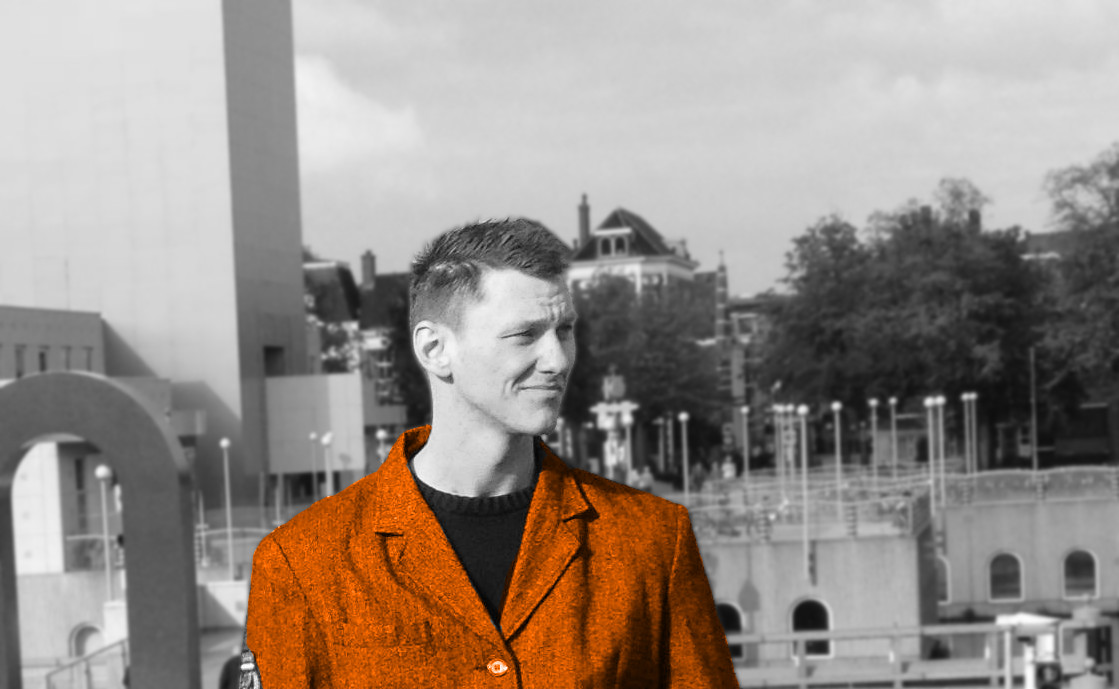
myfoto.jpg
LICENSE
MIT License

Copyright (c) 2017 Jan Küster

Permission is hereby granted, free of charge, to any person obtaining a copy
of this software and associated documentation files (the "Software"), to deal
in the Software without restriction, including without limitation the rights
to use, copy, modify, merge, publish, distribute, sublicense, and/or sell
copies of the Software, and to permit persons to whom the Software is
furnished to do so, subject to the following conditions:

The above copyright notice and this permission notice shall be included in all
copies or substantial portions of the Software.

THE SOFTWARE IS PROVIDED "AS IS", WITHOUT WARRANTY OF ANY KIND, EXPRESS OR
IMPLIED, INCLUDING BUT NOT LIMITED TO THE WARRANTIES OF MERCHANTABILITY,
FITNESS FOR A PARTICULAR PURPOSE AND NONINFRINGEMENT. IN NO EVENT SHALL THE
AUTHORS OR COPYRIGHT HOLDERS BE LIABLE FOR ANY CLAIM, DAMAGES OR OTHER
LIABILITY, WHETHER IN AN ACTION OF CONTRACT, TORT OR OTHERWISE, ARISING FROM,
OUT OF OR IN CONNECTION WITH THE SOFTWARE OR THE USE OR OTHER DEALINGS IN THE
SOFTWARE.
How to use this template
Everything runs in your browser: nothing to install, no login, no compile timeout.
- Click Open in LaTeX.to. The template opens as a project in the Projects pane, with main.tex in the editor and its finished PDF in the preview.
- Click Preview, or press Ctrl+Enter (Cmd+Enter on a Mac), to compile. The preview shows the new PDF; you do not need to save first.
- If the compile fails, the Console pane opens with the LaTeX log. The first error in it says what went wrong and on which line.
- To add an image, a .bib file or another .tex file, open the project's menu (the three dots next to its name in the Projects pane) and choose Upload file or New file.
- The arrow next to Preview has Download PDF. Ctrl+S saves your edits, and the project stays in your browser on this device.
How to add more lines to an entry
Users of both layouts ask how to give a job more than the two lines of the example.
- In the Classic layout the last argument of
\cveventis a list: add{Your third line},as one more pair of braces inside it, with a comma between the pairs. - In the Modern layout
\cveventtakes exactly two lines, in its last two pairs of braces. - For a third one there, end the last line with
\newline \larrow{bgcol}and write the new line after it, inside the same braces. - The Classic example fills its page, so two more lines move the end of the CV on to a second page.
How to write the CV in Chinese
The most commented request in the repository is Chinese text, and both layouts take it under pdfLaTeX with the CJK package.
- Add
\usepackage{CJKutf8}on the line before\begin{document}. - Add
\begin{CJK}{UTF8}{gbsn}on the line after\begin{document}, and\end{CJK}on the line before\end{document}. gbsnis a Simplified Chinese Song font. Writegkaifor Kai, orbsmifor Traditional Chinese.- These fonts have no bold, so Chinese in a job title prints in the regular weight.
More templates: Awesome CV, billryan resume, sb2nov resume, Deedy Resume, Jake's Resume, McDowell CV, moderncv, AltaCV and all templates.