biblatex and Biber online
Run biblatex and Biber online in your browser: modern citation styles with Unicode sorting, and no Perl to install.
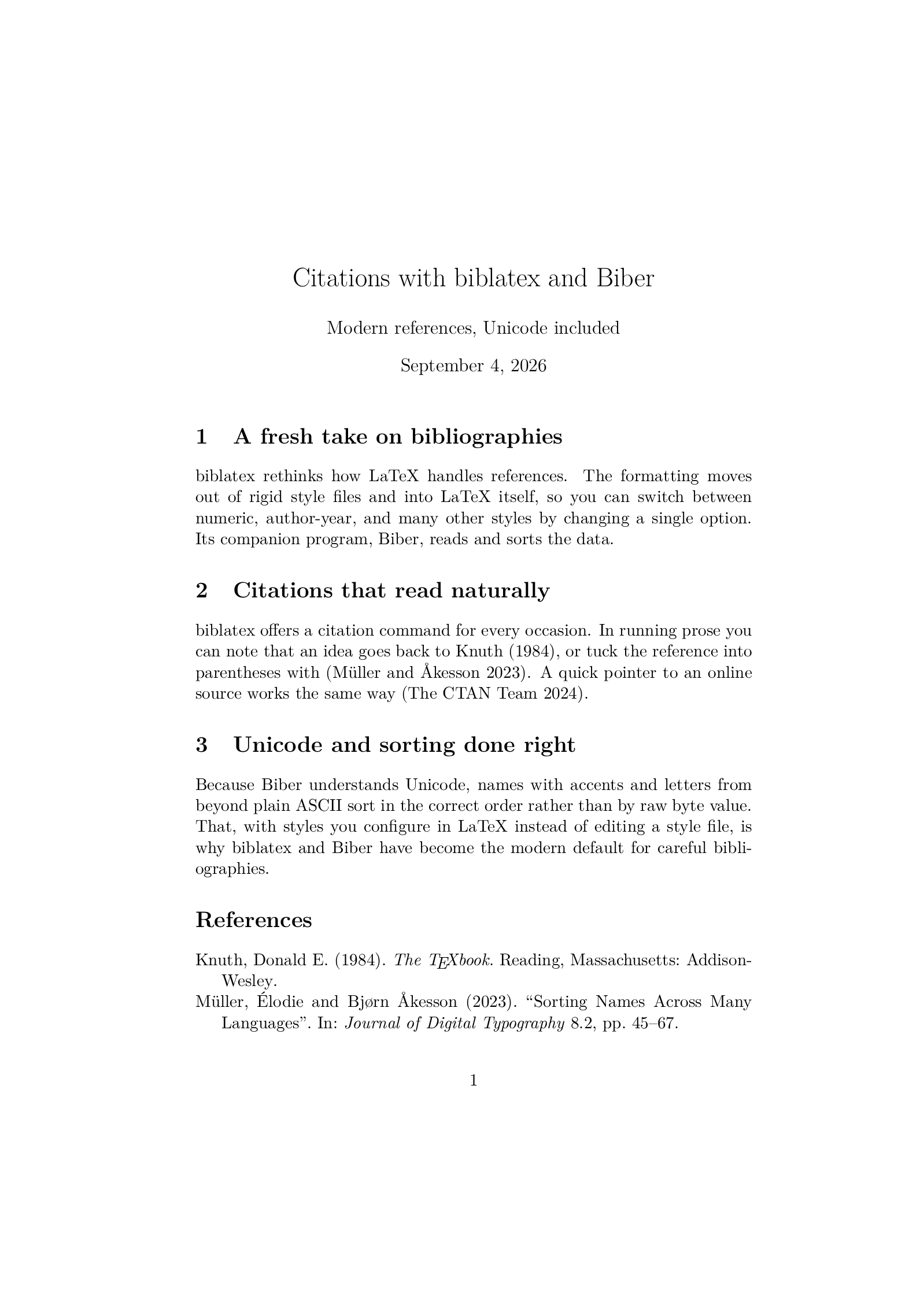
Open in LaTeX.to Download the example (zip)
- Recommended Active, 2009
- Magic comment:
% !BIB program = biberon the first line of main.tex, which is how the example picks it under Auto. - License: Public domain, use freely.
- Files:
main.tex
% !BIB program = biber
\documentclass[11pt]{article}
\usepackage[T1]{fontenc}
\usepackage{lmodern}
\usepackage[backend=biber,style=authoryear]{biblatex}
\addbibresource{references.bib}

\title{Citations with biblatex and Biber}
\author{Modern references, Unicode included}
\date{\today}

\begin{document}
\maketitle

\section{A fresh take on bibliographies}
biblatex rethinks how LaTeX handles references. The formatting moves out of
rigid style files and into LaTeX itself, so you can switch between numeric,
author-year, and many other styles by changing a single option. Its companion
program, Biber, reads and sorts the data.

\section{Citations that read naturally}
biblatex offers a citation command for every occasion. In running prose you can
note that an idea goes back to \textcite{knuth1984}, or tuck the reference into
parentheses with \parencite{unicode2023}. A quick pointer to an online source
works the same way~\parencite{ctanonline}.

\section{Unicode and sorting done right}
Because Biber understands Unicode, names with accents and letters from beyond
plain ASCII sort in the correct order rather than by raw byte value. That, with
styles you configure in LaTeX instead of editing a style file, is why biblatex
and Biber have become the modern default for careful bibliographies.

\printbibliography

\end{document}
references.bib
@book{knuth1984,
  author    = {Donald E. Knuth},
  title     = {The {\TeX}book},
  publisher = {Addison-Wesley},
  location  = {Reading, Massachusetts},
  year      = {1984}
}

@article{unicode2023,
  author  = {Élodie Müller and Bjørn Åkesson},
  title   = {Sorting Names Across Many Languages},
  journal = {Journal of Digital Typography},
  volume  = {8},
  number  = {2},
  pages   = {45--67},
  year    = {2023}
}

@online{ctanonline,
  author  = {{The CTAN Team}},
  title   = {The Comprehensive {\TeX} Archive Network},
  year    = {2024},
  url     = {https://ctan.org},
  urldate = {2024-01-15}
}
How to run biblatex (Biber) on LaTeX.to
Everything runs in your browser: nothing to install, no login, no compile timeout.
- Click Open in LaTeX.to. The example opens as a project with main.tex in the editor and its finished PDF in the preview.
- Edit, then press Ctrl+Enter (Cmd+Enter on a Mac). The first compile downloads what this engine needs; after that a compile takes seconds.
What biblatex and Biber are
biblatex is a LaTeX package. It replaces \bibliographystyle and \bibliography with \usepackage[style=...]{biblatex}, \addbibresource{file.bib} and \printbibliography, and formats every entry with LaTeX macros rather than a .bst file, so a style is something you can read and adjust. Biber is the program biblatex runs between LaTeX passes to read the .bib, sort it and write the data back. It replaced BibTeX for that job because BibTeX is 8-bit and Biber reads Unicode, sorts by locale, and knows fields BibTeX never heard of.
The example on this page is an article with style=authoryear, three kinds of entries including an @online one, and \parencite, \textcite and \autocite in the text. On LaTeX.to the whole loop runs from one Ctrl+Enter:
- The first LaTeX pass writes a
.bcffile. - The pipeline runs
biberon it and reruns LaTeX until the "Please (re)run Biber" warning is gone. - Biber is a large Perl program, so the first compile that needs it downloads noticeably more than a plain document; after that it is cached.
When to use it
- A document you control, where you pick the style:
numeric,authoryear,alphabetic,apa,ieeeand many more ship with TeX Live. - References in several languages, or names with accents that must sort correctly.
- Web pages, datasets and software as sources:
@onlinewithurlandurldateis a real entry type, and the style prints the access date. - Not for a journal template that ships a
.bstfile, and not withnatbiborciteloaded, which biblatex replaces.
biblatex vs BibTeX
- BibTeX: the older tool and what journals still expect.
- biblatex with Biber: the modern one for a document that is yours.
backend=bibtex: keeps biblatex's styles but runs classic BibTeX, for publishers who will not run Biber; it loses Unicode sorting and several newer fields, and Auto detects the option.
The same .bib file works with both, so switching needs no conversion. The full comparison is on BibTeX vs biblatex.
Common errors
Cannot find 'main.bcf': biblatex was not loaded, or the LaTeX pass failed before writing it. Read the LaTeX errors first.Incompatible package 'natbib'(or'cite'): remove that package, biblatex replaces it.- A citation printed in bold as
[key]: the key matches no entry. Keys are case-sensitive.
More engines: BibTeX and all engines. Compare: BibTeX vs biblatex.