LaTeX exam template
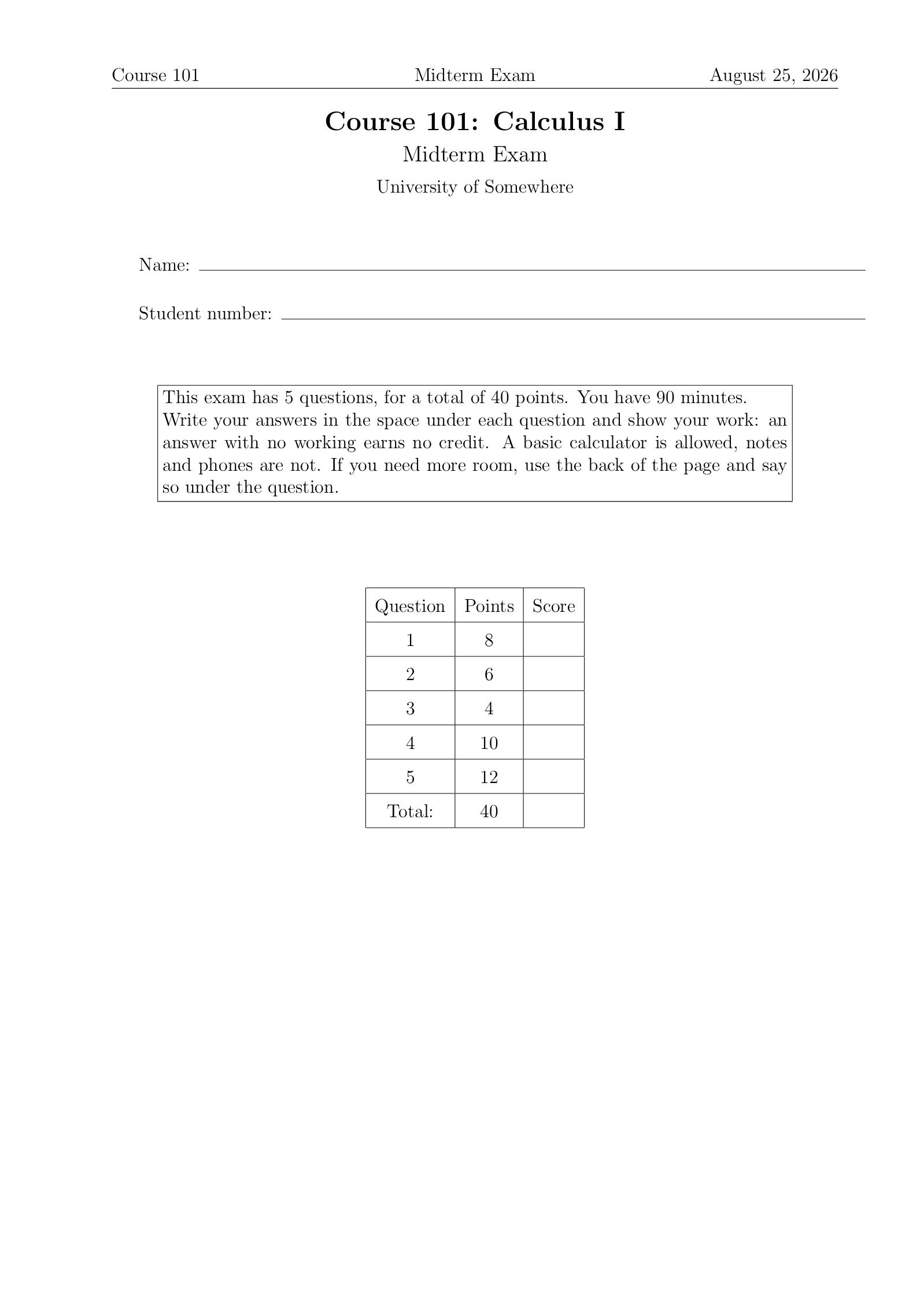
A LaTeX exam template for a midterm or a final you print and hand out, with the answer key in the same file.
- Engine: pdfLaTeX
- License: Public domain, use freely.
Open in LaTeX.to Download all files (zip)
Files:
main.tex
% addpoints keeps a running total, which is what fills the grade table.
\documentclass[addpoints,12pt]{exam}

\usepackage{amsmath}
\usepackage{amssymb}

% Uncomment the next line to print the answer key: the solutions appear and
% the correct choices are marked. Comment it out again for the student copy.
% \printanswers

\pagestyle{headandfoot}
\firstpageheader{Course 101}{Midterm Exam}{\today}
\runningheader{Course 101}{Midterm Exam}{Page \thepage\ of \numpages}
\firstpagefooter{}{}{}
\runningfooter{}{}{}
\headrule

\begin{document}

\begin{center}
  {\Large\bfseries Course 101: Calculus I} \\[2mm]
  {\large Midterm Exam} \\[2mm]
  University of Somewhere
\end{center}

\vspace{8mm}

% One line per thing the student writes on the cover.
\makebox[\textwidth]{Name:\enspace\hrulefill}

\vspace{6mm}

\makebox[\textwidth]{Student number:\enspace\hrulefill}

\vspace{10mm}

\begin{center}
  \fbox{\parbox{0.86\textwidth}{
    This exam has \numquestions{} questions, for a total of \numpoints{}
    points. You have 90 minutes.

    Write your answers in the space under each question and show your work:
    an answer with no working earns no credit. A basic calculator is allowed,
    notes and phones are not. If you need more room, use the back of the page
    and say so under the question.
  }}
\end{center}

\vspace{10mm}

\begin{center}
  \gradetable[v][questions]
\end{center}

\newpage

\begin{questions}

% Points go in the brackets. A question with parts leaves them off: its points
% are the points of its parts, added up.
\question
Differentiate each function. You do not have to simplify the result.

\begin{parts}
  \part[4] $f(x) = x^3 \ln x$
  \vspace{3cm}

  \part[4] $\displaystyle g(x) = \frac{\sin x}{1 + x^2}$
  \vspace{3cm}
\end{parts}

\question[6]
Which of the following is the derivative of $h(x) = e^{2x}$?

\begin{choices}
  \choice $e^{2x}$
  \CorrectChoice $2 e^{2x}$
  \choice $2x e^{2x - 1}$
  \choice $\dfrac{e^{2x}}{2}$
\end{choices}

\question[4]
The value of $\displaystyle \int_{0}^{1} 3x^2 \, dx$ is

% oneparchoices puts short choices on one line instead of one each.
\begin{oneparchoices}
  \choice $0$
  \choice $\dfrac{1}{3}$
  \CorrectChoice $1$
  \choice $3$
\end{oneparchoices}

\question[10]
Find the equation of the tangent line to the curve $y = x^2 - 4x + 5$ at the
point where $x = 3$.

\begin{solution}
  The derivative is $y' = 2x - 4$, so the slope at $x = 3$ is $2$. The point
  on the curve is $(3, 2)$, and the tangent line is
  \[
    y - 2 = 2(x - 3), \quad \text{that is} \quad y = 2x - 4 .
  \]
\end{solution}

\fillwithlines{5cm}

\question
A ball is thrown upward, and its height in meters after $t$ seconds is
$s(t) = 20t - 5t^2$.

\begin{parts}
  \part[4] Find the velocity of the ball after $t$ seconds.

  \begin{solution}
    $v(t) = s'(t) = 20 - 10t$ meters per second.
  \end{solution}
  \vspace{2.5cm}

  \part[4] At what time does the ball reach its highest point?

  \begin{solution}
    The velocity is zero at $t = 2$ seconds.
  \end{solution}
  \vspace{2.5cm}

  \part[4] How high does it get?

  \begin{solution}
    $s(2) = 40 - 20 = 20$ meters.
  \end{solution}
  \vspace{2.5cm}
\end{parts}

\end{questions}

\end{document}
How to use this template
Everything runs in your browser: nothing to install, no login, no compile timeout.
- Click Open in LaTeX.to. The template opens as a project in the Projects pane, with main.tex in the editor and its finished PDF in the preview.
- Click Preview, or press Ctrl+Enter (Cmd+Enter on a Mac), to compile. The preview shows the new PDF; you do not need to save first.
- If the compile fails, the Console pane opens with the LaTeX log. The first error in it says what went wrong and on which line.
- To add an image, a .bib file or another .tex file, open the project's menu (the three dots next to its name in the Projects pane) and choose Upload file or New file.
- The arrow next to Preview has Download PDF. Ctrl+S saves your edits, and the project stays in your browser on this device.
How to print the answer key
One line switches between the student copy and the key.
- Near the top of
main.tex, remove the%in front of\printanswers. - Compile: the solutions appear and the correct choices are marked.
- Download that PDF, then put the
%back and compile again for the copy the students get.
How to add a question
Questions and points are counted for you, and the grade table on the cover fills itself in.
- Inside
\begin{questions}, add\question[10]with the points in the brackets, then the text of the question. - For a question with parts, leave the brackets off
\questionand put\part[4]lines between\begin{parts}and\end{parts}; the parts add up. - Multiple choice goes between
\begin{choices}and\end{choices}, one\choiceper answer and\CorrectChoicefor the right one. - Give room to write with
\vspace{3cm}or\fillwithlines{5cm}after the question. - To show the answer in the key, put it between
\begin{solution}and\end{solution}right after the question.
How to change the header
The course name and the exam title are set in two places.
- The
\firstpageheader{Course 101}{Midterm Exam}{\today}line prints on the first page, and\runningheaderon every page after it, with the page count. - The centered block after
\begin{document}is the title on the cover; change the course, the exam and the university there too.
More templates: Lecture notes and all templates.